
How to Inspect and Save Authorized Web Audio: Podcasts, BGM, and Direct Files
You may need to save audio that you published yourself, a podcast that provides download permission, or a reusable track from a site whose license allows local copies. The browser often loads these files through direct URLs or streaming playlists even when the page does not expose a conventional file link.
This guide explains how to identify those requests and save supported audio when you have permission to do so. It does not cover paid-content bypassing, DRM removal, or access-control circumvention.
Why Web Audio Is Hard to Download Directly
Browsers have no built-in "batch save" for audio files. Right-click an <audio> element and sometimes you'll see "Save as," but most modern sites either disable the context menu entirely or the "save" option only grabs a temporary, token-laden URL that's already 403 by the time you open it.
Then there are the trickier cases:
HLS audio streams — podcast platforms and course sites often deliver audio via HLS, chopped into hundreds of segments just like HLS video. You get the M3U8 URL, it plays fine, but "Save as" only saves that few-KB playlist file. Same principle applies.
Signed direct links — some platforms generate time-limited URLs for each request. Copy the link into IDM or your browser's download bar, and you'll likely get a 403.
Session-bound content — some authorized sources require the current page session. A copied link may fail outside that context. FlowPick does not turn a valid session into permission to copy content; the source license and terms still apply.
FlowPick can observe media requests made during playback. Whether it can make a later download request with the required browser context depends on the source, browser, and selected path; temporary URLs may expire.
What Audio FlowPick Can Detect
By monitoring all network requests via the webRequest API, FlowPick can detect:
- Direct audio files: MP3, M4A, AAC, WAV, FLAC, OGG, WEBA, etc. — visible as soon as the page loads
- HLS audio streams: audio-only tracks in M3U8 playlists, requiring a play click to trigger the request
- DASH audio tracks: independent audio AdaptationSets in DASH streams, typically M4A/AAC format
- Page background music: BGM that auto-requests on page load — a page refresh is enough to detect it
What it can't detect:
- Audio synthesized client-side via the Web Audio API (no network request)
- Widevine/PlayReady DRM-encrypted audio (Spotify and similar platforms)
- Base64 audio data embedded inline in HTML
Supported Audio Formats
| Format | Extension | Common Use |
|---|---|---|
| MP3 | .mp3 | Podcasts, music, audiobooks |
| M4A/AAC | .m4a, .aac | Apple devices, YouTube audio tracks |
| WAV | .wav | Game sound effects, pro recordings |
| FLAC | .flac | Lossless music |
| OGG | .ogg | Game BGM, some podcasts |
| WebM Audio | .weba | Chrome-based browsers |
| HLS audio stream | .m3u8 | Podcast platforms, course sites |
| DASH audio track | .mpd | Bilibili audio-only, YouTube Music |
Step-by-Step: Sniff and Download Audio
Step 1: Refresh the Page or Trigger Playback
The key action depends on the audio type:
- Page BGM / auto-play audio: just refresh the page. The BGM load request is captured by FlowPick immediately — no manual action needed
- Podcasts/audiobooks that require clicking play: click the play button, wait for playback to start (usually 2-3 seconds), then open FlowPick
- HLS audio streams: FlowPick only sees the M3U8 request after you hit play. No playback, no stream visible
Step 2: Open the FlowPick Popup
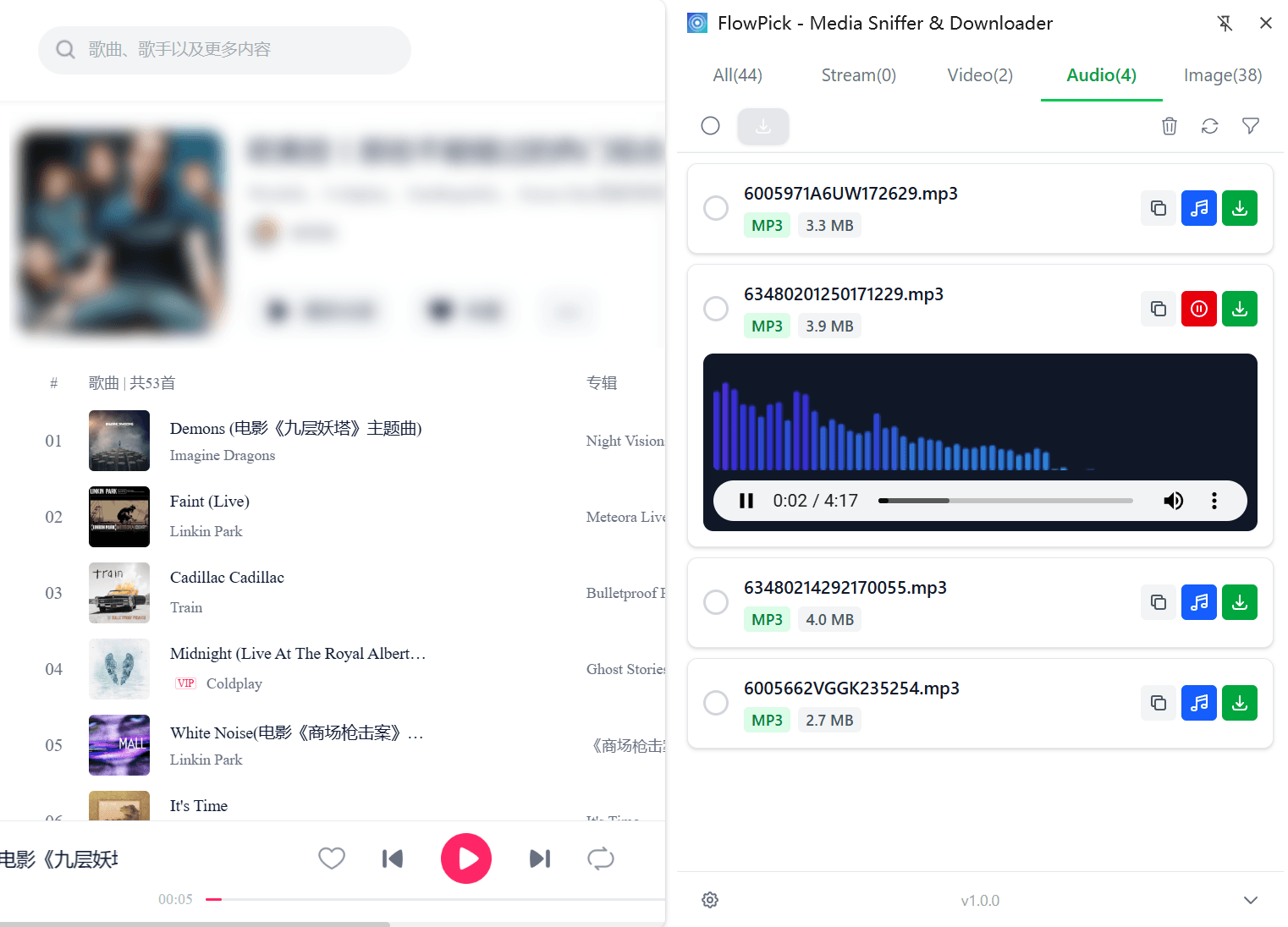
Click the FlowPick icon in your browser toolbar. The badge number on the popup shows the total media resources detected on the current page.
Step 3: Switch to the Audio Tab
The top of the popup has media type tabs. Click the Audio tab (🎵 icon). You'll see a list of all detected audio resources, each showing filename, format, and file size (if the server returned Content-Length).
If the file size shows as "Unknown" — that's normal. The server didn't include the size in the response headers. Doesn't affect the download.
Step 4: Select and Download
Single file: click the download icon on the right to download directly.
Batch download: check multiple entries → click Download Selected at the top. FlowPick queues them sequentially; the popup shows progress.
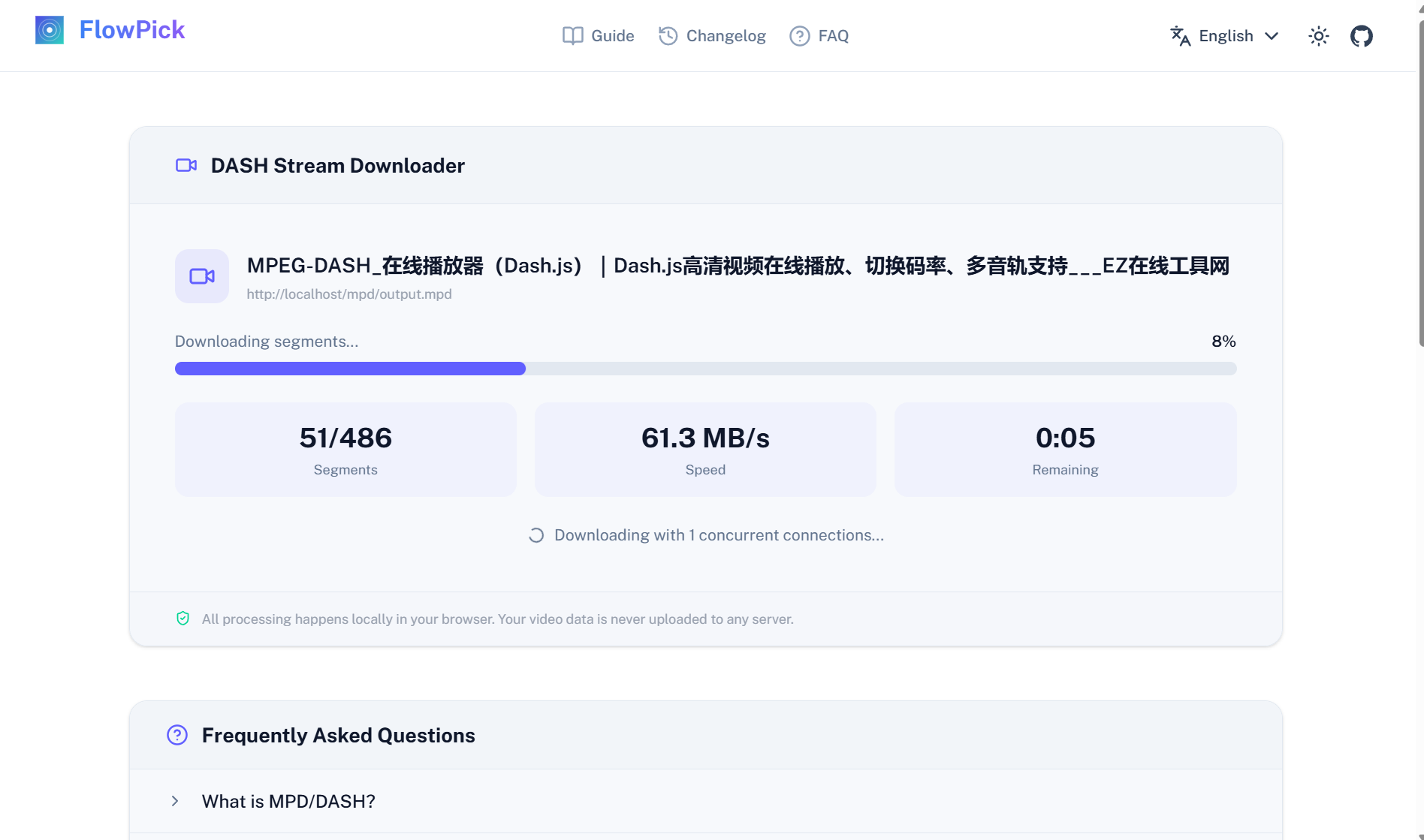
For a supported HLS audio stream, select a downloader path that processes the playlist and its segments. The output format depends on the source codec and selected workflow; do not expect every stream to become MP3. See how FlowPick handles streaming segments for the current local architecture.
Scenario-Specific Workflows
Batch Saving Podcasts
Common podcast platform behavior: when the homepage list loads, each episode's audio URL may not have been requested yet — the audio request only fires when you enter the episode page or click play.
Workflow rhythm:
- Open the podcast show page
- Click play on each episode one by one (even just 2 seconds is enough)
- Don't close the tab — keep clicking play on the next episode
- After triggering multiple episodes in sequence, open FlowPick → Audio tab
- Select All → Download Selected
This queues up all triggered episodes for download in one batch — no need to wait for each one individually.
Note: if the platform only loads 20 episodes at a time, scroll to the bottom to load more, then continue triggering playback to detect the later episodes.
Audiobooks by Chapter
Audiobook platforms typically split each chapter into a separate audio file. Go to the listening page, play chapter one — FlowPick shows the audio entry. If the platform preloads multiple chapters at once, they'll all appear — select all and batch download.
If the platform only loads the next chapter after the current one finishes: play, download, switch to next chapter, play, download again, repeat. Compared to right-click-saving each one in the browser, FlowPick handles it faster — especially HLS streams where you don't have to manually deal with segments.
Website Background Music
Lots of creative sites, game promo pages, and product landing pages have carefully crafted BGM. This type of audio usually auto-requests on page load — no action needed to trigger it.
Open the page (wait for BGM to start) → immediately open FlowPick → it's already in the Audio tab. Usually MP3 or M4A format, ready to download directly.
YouTube Music / Bilibili Audio-Only
YouTube and Bilibili audio-only content uses DASH, with audio and video tracks separated. The FlowPick popup shows both video entries and audio entries — if you only need the audio, switch to the Audio tab and download the audio track directly. No need to download the entire video and extract audio afterwards.
Bilibili's DASH audio tracks are typically M4A format, 128kbps or 320kbps (premium). The full Bilibili download workflow is covered in more detail in How to Download Bilibili Videos to Your Computer.
Course Platform Audio Lectures
Some course platforms offer standalone audio versions of courses, or the main video's HLS audio track can be downloaded separately. In the FlowPick popup: if you see a video stream (M3U8) and also a separate M3U8 entry in the Audio tab, the platform is transmitting audio and video separately — download the audio track directly. Smaller file, perfect for commute listening.
Filtering Out Unwanted Audio
Not all audio on a page is what you want — ad audio, UI interaction sounds, and page notification chimes all get detected.
Filter by file size: in FlowPick settings, set a minimum file size (e.g., 500KB) to eliminate the vast majority of short UI sounds and ad audio. Podcast episodes are typically tens of MB; audiobook chapters are at least several MB. This threshold works well.
Manually uncheck: before batch downloading, scan the list. Manually uncheck entries with keywords like "ad," "jingle," or "notify" in the filename.
Common Issues
Detected but download fails
Most likely the URL contains a time-limited token, and too much time passed between opening the popup and actually clicking download — the token expired. Refresh the page, re-trigger playback, re-detect, then download immediately.
HLS audio downloads as an empty or few-KB file
The M3U8 file itself is only a few KB — it's a playlist, not audio content. When downloading HLS audio, FlowPick should automatically parse and download all segments and merge them. If you get a few-KB file, FlowPick only saved the playlist without triggering the segment download pipeline.
Switch to Chrome or Edge — merge functionality is most stable on these two browsers.
File downloaded but won't play
A few possibilities:
- Mislabeled format: the server sent M4A but the Content-Type header says
audio/mpeg, so it saved as .mp3. Try forcing it open in VLC, or manually rename the extension to .m4a - Missing HLS segments: playback buffering wasn't complete when stopped, some segments didn't finish downloading. Re-download and make sure the FlowPick progress bar reaches 100%
- DRM encrypted: Spotify, NetEase Cloud Music VIP tracks, and similar platforms use DRM. What you downloaded is encrypted data — no player can open it. FlowPick can't handle this type of content
Downloaded podcast has music but no voice
Rare edge case: the platform split background music and vocals into two separate audio tracks (DASH multi-AdaptationSet), and you only downloaded one. Check if there's another entry in the FlowPick audio list. Select both and download, then mix with FFmpeg:
ffmpeg -i voice.m4a -i bgm.m4a -filter_complex amix=inputs=2 output.mp3
Privacy Note
Extension detection and supported local download paths process media in the browser, while the browser still requests source data from the originating site. If you explicitly choose an optional cloud download workflow, the media URL or data may be sent to the service as that feature explains. Read the privacy and security guide and the selected tool page before choosing a path.
Recommended Reading
- How to Download Bilibili Videos to Your Computer — Bilibili's DASH audio tracks can also be downloaded separately
- How FlowPick Merges Video Segments into MP4 in the Browser — HLS audio stream segment merging uses the same pipeline