
The Code Is Open Source! How I Built FlowPick in Three Months
Today I pushed the code to GitHub. The repo is public now.
I'm not writing this to celebrate. I mainly want to document the pitfalls I fell into over those three months — so I can look them up later when I forget, and as a reference for anyone with the same needs. This will get into some technical details, but I'll keep it conversational. This is a story, not a spec document.
The Trigger: An Experience That Bugged Me for Months
Late last year, I was following a series of technical courses on an online learning platform. The platform didn't allow downloads, but I had a habit of watching offline — no signal on the subway commute, unreliable coffee shop WiFi, and on the way home I'd want to replay a section without scrubbing through a progress bar.
I tried Video DownloadHelper. For HLS streams, it required installing CoApp. Fine, I installed CoApp. Then it threw an error on an encrypted course. I searched for a few online tools — the ones that worked were either speed-capped, crashed on large files, or routed through a server proxy, which I wasn't comfortable with.
youtube-dl could handle some of it, but yt-dlp didn't recognize that platform at all — either there was no extractor for it, or the cookies wouldn't pass through.
This dragged on for months. Then one weekend, with nothing better to do, a thought popped into my head: isn't this just "parse M3U8, download segments, stitch files together"? Could this be done inside a browser?
I opened MDN and started browsing. The Web Crypto API, File System Access API, and WebAssembly — all three had stabilized in recent years, and compatibility on Chrome was no longer an issue. So I started coding.
Week 1: Figuring Out "Can We Even Detect It?"
The first problem any tool has to solve: how do you know what videos are on the page?
Browser extensions have an API called webRequest that can listen to all network requests made by a tab — and I mean all requests, at the network layer, not the DOM layer. The moment a player sends out an M3U8 or MPD request, the extension can intercept it.
Extension → webRequest.onBeforeRequest
         → Filter by Content-Type
         → Hit application/x-mpegurl → Record as HLS
         → Hit application/dash+xml  → Record as DASH
         → Hit video/*               → Record as direct video
This part went faster than I expected. Two days later, I had a prototype that could list all video streams on the current page in the extension popup. I opened Bilibili to test — boom, it listed video streams, audio streams, ad streams, everything, complete with URLs and file sizes.
One detail tripped me up for a while: M3U8 comes in two flavors — Master Playlist and Media Playlist. The Master is a directory listing all available quality levels, each pointing to a Media Playlist; the Media Playlist is the actual segment manifest. I initially displayed both, and users saw a mess of entries with no idea which to pick. I later changed it: when a Master Playlist is detected, automatically parse the quality options inside and only show a human-readable resolution list, hiding the raw URL hierarchy.
Week 3: The First Real Hard Problem — Where Do the Files Go?
Downloading hundreds of segments — that's an async concurrency problem, not a hard one. The hard part was where to put all that data.
Browser JavaScript has no default permission to access the filesystem. The simplest approach is to accumulate all the data into a Blob, then trigger a download — URL.createObjectURL(blob) paired with a hidden <a> tag.
I got the prototype running with this method first. 500MB video, no problem. 800MB, still fine. 1GB, Chrome started to stutter — the reason was obvious. Blob mode loads the entire file into memory. A 1GB video means the browser is holding 1GB of ArrayBuffer, plus the page and extension overhead. Memory pressure was severe. Above 1.5GB, it just froze.
I set a hard limit on Blob mode: refuse to process anything over 1.5GB, warn at 800MB. That wasn't solving the problem — it was just drawing a line around it.
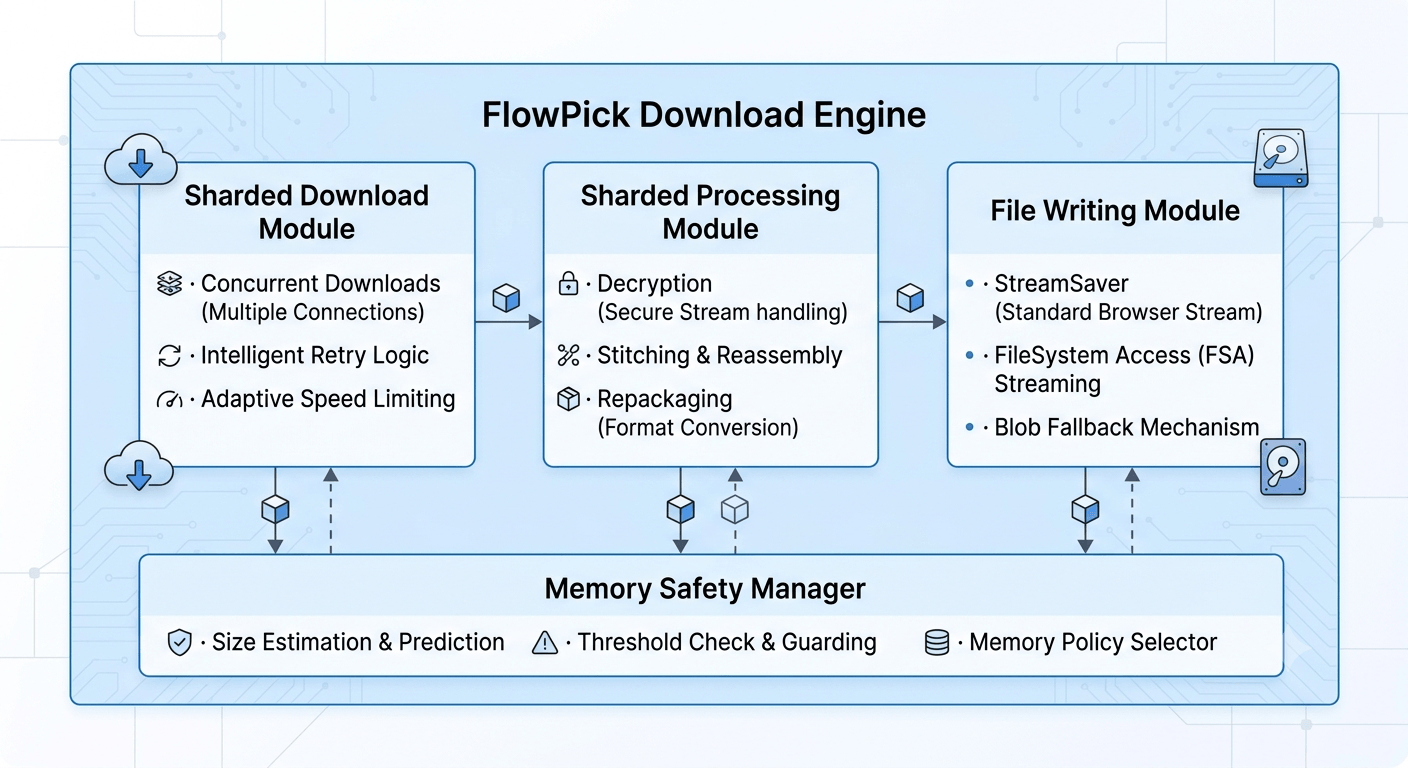
The real solution was the File System Access API (FSA). Supported since Chrome 86, it lets JavaScript obtain a file handle and then continuously write through a WritableStream — just like a native program writing to a file. Only the current chunk being written is in memory at any time, completely independent of total file size.
const writable = await handle.createWritable()
// Configured with a 16MB buffer
const stream = new WritableStream({
  async write(chunk) { await writable.write(chunk) },
  async close() { await writable.close() }
}, { highWaterMark: 16 * 1024 * 1024 })
With this, downloading a 5GB video and a 500MB video use essentially the same amount of memory.
But Firefox doesn't support the FSA API, and neither does Safari. I needed a fallback.
I ended up with a three-tier write strategy:
- Prefer FSA API (Chrome/Edge, no size limit)
- Fall back to StreamSaver.js (relies on Service Worker, better compatibility)
- Last resort Blob mode (all browsers, but 1.5GB limit)
Which tier gets used is determined at runtime. The user never needs to know what's happening behind the scenes.
Week 5: The Real Boss Fight — Merging Segments into MP4
I could download segments. I could write files. But HLS segments are in TS format (MPEG Transport Stream), and most people want MP4.
If you just binary-concatenate 180 .ts files end to end, you get a big .ts file. VLC can play it, but Windows' native player won't recognize it, CapCut can't import it, and uploading to Bilibili throws a format error. It technically works, but the user experience is terrible.
TS to MP4 is fundamentally remuxing: extract the video and audio streams from TS and repackage them into MP4's container structure. No re-encoding involved, so it should be fast in theory, with zero quality loss.
The question was: in a browser, who's going to do this?
The answer had existed for about a year already — FFmpeg had been compiled to WebAssembly. Several open-source projects had done this, the most well-known being @ffmpeg/ffmpeg. WASM can run near-native-speed binary code inside the browser's JavaScript environment, and FFmpeg natively supports remuxing.
In theory, all I needed to do was:
- Load FFmpeg WASM
- Write segments into FFmpeg's virtual filesystem (it simulates a filesystem in memory)
- Run this command:
ffmpeg -f concat -safe 0 -i filelist.txt \
  -c copy \
  -movflags +faststart \
  -bsf:a aac_adtstoasc \
  output.mp4
-c copy is stream copy — no re-encoding, just a container swap. -bsf:a aac_adtstoasc converts AAC audio from the ADTS packaging used by TS to the ASC packaging used by MP4; without it, some players have audio issues. -movflags +faststart moves the MP4 index (moov atom) to the file start for streaming playback.
Sounded great. In practice, I hit several walls:
Wall 1: FFmpeg WASM takes 10-30 seconds to load the first time.
The WASM core file is about 30MB, needing network download and compilation. The user clicks download, then waits 20 seconds with nothing happening — terrible UX.
Fix: trigger FFmpeg loading the moment the download starts, running it in parallel with segment downloads. By the time all segments are downloaded, FFmpeg is usually initialized, making the wait imperceptible. Plus, with browser caching, subsequent loads only take 2-5 seconds.
Wall 2: The WASM virtual filesystem lives in memory.
FFmpeg processes files by first writing them into its virtual filesystem. A one-hour 1080P video — 600-800MB of segments — all written into WASM memory. Add FFmpeg's own runtime memory (200-400MB), and you easily exceed WASM's 4GB address space limit. Crash.
This wasn't an occasional issue with large files — it was inevitable. I needed a large-file solution that didn't depend on FFmpeg WASM.
Week 7: Writing TSToMP4Muxer
I spent nearly two weeks writing a pure-JavaScript TS → MP4 streaming remuxer called TSToMP4Muxer.
The principle: instead of waiting for all segments to download before processing, download, parse, and write to disk simultaneously. Each TS data packet is fixed at 188 bytes. I read packet by packet, extract PES (Packetized Elementary Stream) data, convert it to MP4 Box format in real time, and continuously write to disk via the Streams API.
Segment 0 downloaded
  → Parse 188-byte TS packets
  → Extract video/audio PES
  → Write to MP4 mdat Box
Segment 1 downloaded
  → Keep appending
...
Segment N written
  → Write moov Box (index)
  → Close file
This way, only the currently-processing segment is in memory at any time — completely decoupled from total file size. And since it's pure JS, there's no need to load the FFmpeg WASM file, saving that 30MB load overhead and initialization time.
The trade-off is narrower coverage — it only does single TS → MP4. It can't handle DASH audio/video merging (which requires synchronized dual-input processing) or various edge-case formats. But for the most common scenario — HLS downloads — TSToMP4Muxer is the better solution.
The current logic: regular HLS prefers TSToMP4Muxer for streaming processing — fast and memory-efficient. DASH or dual-stream merging scenarios use FFmpeg WASM. HLS files over 2GB also go through TSToMP4Muxer to avoid WASM memory overflow.
Writing this took a long time. The MP4 Box structure has a spec — a 600+ page spec. I only read the few dozen pages relevant to remuxing. ftyp, moov, mvhd, trak, mdia, minf, stbl — if the nesting hierarchy of these Boxes is wrong, players can't read the file. The debugging loop was: write it, open in VLC, see what error it throws, check the spec, fix, repeat. Probably cycled through this twenty-plus times.
The most maddening moment: the video played, but the timeline was scrambled — dragging the seek bar jumped to random positions, not where you expected. The cause: the timestamp calculations in the stts (Sample to Time) and ctts (Composition Time Offset) Boxes weren't handling B-frame DTS/PTS offsets. H.264 has B-frames, where decode order (DTS) and display order (PTS) differ. The ctts Box has to separately record each frame's display time offset. Found the problem, fixed it — took two days.
Week 9: AES-128 Encryption — Easier Than I Thought
I'd always assumed encrypted video handling would be the hardest part. Turns out it was way easier than TSToMP4Muxer.
HLS encryption is clearly specified in the M3U8:
#EXT-X-KEY:METHOD=AES-128,URI="https://api.example.com/key?token=abc",IV=0x00000000000000000000000000000001
The logic is:
- Spot
#EXT-X-KEY, parse out the Key URI and IV - Request the Key URI to get the 16-byte key (the request comes from the browser extension, carrying the user's current cookies — so even keys that require login are accessible)
- For each downloaded segment, use the
Web Crypto APIfor AES-128-CBC decryption
const keyBytes = await crypto.subtle.importKey('raw', key, { name: 'AES-CBC' }, false, ['decrypt'])
const decrypted = await crypto.subtle.decrypt({ name: 'AES-CBC', iv: ivBuffer }, keyBytes, encryptedData)
crypto.subtle is the browser's built-in Web Crypto API, with hardware acceleration under the hood. Decryption speed isn't a bottleneck — a few milliseconds per segment.
What actually took time was IV handling. The HLS spec says: if the M3U8 doesn't explicitly declare an IV, each segment's IV should use the segment's sequence number (MSB format, 16 bytes). I initially didn't handle this rule and used the first IV for all segments. Encrypted courses decrypted with correct video but garbled audio. Looked up RFC 8216, found the rule, added it — fixed.
What can't be handled: Widevine, PlayReady, FairPlay. These are DRM. The keys live in the OS or hardware; JavaScript simply can't access them. When FlowPick encounters this type of content, it can only honestly tell the user "not supported" — there's no way around it. Netflix and Disney+ are in this category and were never in scope.
Week 11: DASH Audio/Video Merging
DASH is the other major streaming format, used by YouTube and regular Bilibili uploads. The core difference from HLS: audio and video are two completely independent streams.
This isn't a design flaw — it's intentional. It lets platforms store one video track and pair it with multiple language audio tracks, slashing storage costs by several times. But for a download tool, it means you have to download two streams simultaneously and then merge them.
Merging two streams uses FFmpeg WASM:
ffmpeg
  -f concat -safe 0 -i video_list.txt
  -f concat -safe 0 -i audio_list.txt
  -c:v copy -c:a copy
  -movflags +faststart
  output.mp4
One detail here: DASH segments are in FMP4 (Fragmented MP4) format, not HLS's TS. The special thing about FMP4 is that each segment file can play independently, but to parse them correctly, you must first have an init segment — an initialization fragment containing codec parameters (ftyp + moov Box). Without the init segment, FFmpeg doesn't know the video's resolution, frame rate, or codec, and can't process the subsequent data segments.
So the DASH processing flow has one extra step compared to HLS: download the init segment first, then all data segments, and the init segment must come first during merging. I initially forgot to handle the init segment, and FFmpeg's merged MP4 opened with a "file corrupted" error. Took two days to realize the problem was here.
The DASH parallel download strategy also needed adjustment — video segments and audio segments should download simultaneously, not video first then audio. This nearly halved the total download time. The Worker Pool design supports this: two task streams in parallel, sharing one thread pool — whichever worker is free grabs the next segment from whichever stream.
Concurrent Downloads: Worker Pool, Not Pre-Splitting
I want to call out the concurrent download design separately because one implementation detail made me rewrite it twice.
The most intuitive approach: split 200 segments into 4 equal batches, 4 Workers each handle one batch. The problem with this is load imbalance — HLS segments aren't equal-sized. Segments at the start and end of a video tend to be smaller, middle ones larger. Pre-splitting can leave one Worker stuck on a batch of large segments while the other three are already idle.
FlowPick uses a shared counter approach:
let nextIndex = 0
const worker = async () => {
  while (nextIndex < segments.length) {
    const index = nextIndex++  // Atomically grab the next task
    await downloadAndProcess(segments[index])
  }
}
// Launch N workers, all sharing nextIndex
await Promise.all(Array.from({ length: concurrency }, () => worker()))
Each Worker grabs the next segment the moment it finishes the current one — no waiting for other Workers, regardless of segment size. This naturally achieves dynamic load balancing, with total completion time approaching the theoretical optimum.
The default concurrency is 2, adjustable up to 8. Why not default to 8? Because for some CDNs, high concurrency triggers rate limiting or 429 errors, making things slower. 4-6 concurrent threads is usually the sweet spot; diminishing returns kick in around 8.
The retry mechanism uses exponential backoff: wait 400ms after a failure, then 800ms, then 1600ms. Give up after 3 total failures. Most network hiccups recover on the first or second retry. 4xx errors (403, 404) are not retried — the server explicitly refused, retrying is pointless.
Memory Management: Preventing Browser Crashes
In the final stretch, memory management was what I obsessed over the most.
The problem: you don't know how big the downloaded file will be. A user picks 1080P for a livestream replay — could be 2GB, could be 20GB. You won't know until all segments are downloaded.
I built a sampling-based estimate before downloading:
// Download max(1, total × 10%) segments first, take the average size, multiply by total
const sampleCount = Math.min(5, Math.max(1, Math.floor(totalCount * 0.1)))
Based on the estimate, pick a write strategy: under 800MB, anything goes. 800MB-1.5GB, must use streaming writes. Over 1.5GB, refuse Blob mode.
But estimates aren't enough — runtime monitoring is also needed. During download, continuously track total allocated ArrayBuffer size. Over 600MB triggers a warning. Over 1200MB pauses new segment downloads, prioritizes writing already-downloaded segments to disk and freeing memory, then resumes. This way, even if the estimate is way off, there's a safety net.
Features I Built and Then Deleted
Over three months, a few features got halfway built and then scrapped:
Transcoding: I briefly wanted to support "convert to 720P on download" to reduce file size. Then I realized transcoding in a browser is way too slow — FFmpeg WASM can handle remuxing fine, but re-encoding means decoding every video frame and re-encoding, CPU usage spikes to max, and a 1GB video could take 30 minutes. Unacceptable user experience. FlowPick ultimately only does remuxing (container swap, no codec change). If you want transcoding, use command-line FFmpeg.
Real-time ETA on the progress bar: my first version used instantaneous speed, and the progress bar jittered wildly — CDN segment sizes aren't uniform, so instantaneous speed could bounce between 0.5MB/s and 50MB/s. Switched to a 5-second sliding window average, much smoother.
Multi-file batch downloading: I originally wasn't going to do this, then saw people asking if they could download all episodes at once. Added a simple queue — each download task runs sequentially. No parallel support (two simultaneous video downloads would max out both bandwidth and FFmpeg memory).
The Result After Three Months
About 12,000 lines of TypeScript — extension + online tool + landing page.
What it can do:
- HLS/M3U8 downloads with automatic AES-128 decryption
- DASH/MPD downloads with automatic audio/video merging
- Batch direct video sniffing
- Batch image detection and downloading
- Audio resource detection
- MP4 output, no file size limit (Chrome/Edge)
What it can't do (not laziness — genuinely impossible):
- Widevine/PlayReady/FairPlay DRM — hardware-level protection, JS can't access keys
- Video transcoding — browser compute power isn't enough, experience would be terrible
- Format conversion to MKV/AVI — FFmpeg WASM integration currently only covers the MP4/TS path
The code is open source, repo at GitHub. The extension is published on three browsers: Chrome Web Store, Edge Add-ons, Firefox Add-ons. If you find bugs or have ideas, feel free to open an Issue or send a PR.
Recommended Reading
- How FlowPick Merges Video Segments into MP4 in the Browser — this one tells the story, that one explains the principles. Read them together.
- How to Download M3U8/HLS Streams: A Complete Beginner's Guide — after all those pitfalls, the user only sees five steps.
- What Is DASH Streaming? MPD File Explained — the DASH format mentioned repeatedly throughout this article, explained in detail.
- How to Download Bilibili Videos to Your Computer — DASH audio/video merging in a classic real-world case.
- FlowPick vs. Video DownloadHelper — a head-to-head comparison with the oldest extension in this space.