
How to Download M3U8/HLS Streams: A Complete Beginner's Guide
You're watching a paid course, or a livestream replay you really want to save. You right-click the video — no "save" option. You try a download tool — you get a 3KB .ts file that VLC can't even open.
That's what HLS streaming looks like from the user's perspective. This guide breaks down how it works under the hood and walks you through getting the full video out.
What Is HLS and Why Does It Exist?
HLS — HTTP Live Streaming — was created by Apple in 2009, originally for iPhone streaming. The core idea is simple: instead of sending one giant video file, chop it into small chunks and deliver them one by one over standard HTTP.
The playlist file that ties all the segments together is the M3U8 file — a plain text file with a .m3u8 extension. The .m3u8 URL you see in your browser's Network panel is the video's table of contents, not the video itself.
A typical M3U8 looks like this:
#EXTM3U
#EXT-X-VERSION:3
#EXT-X-TARGETDURATION:10
#EXT-X-MEDIA-SEQUENCE:0
#EXTINF:9.960000,
segment_000.ts
#EXTINF:9.960000,
segment_001.ts
...
#EXT-X-ENDLIST
Each #EXTINF line defines a segment's duration, followed by that segment's URL. A one-hour video with 10-second segments means 360 .ts files. The player downloads them in sequence, and to the user it looks like a continuous stream.
Adaptive Bitrate (ABR)
Most HLS streams are actually adaptive bitrate streams. Instead of a single M3U8, there's a master M3U8 listing multiple quality versions:
#EXTM3U
#EXT-X-STREAM-INF:BANDWIDTH=5000000,RESOLUTION=1920x1080
1080p/index.m3u8
#EXT-X-STREAM-INF:BANDWIDTH=2500000,RESOLUTION=1280x720
720p/index.m3u8
#EXT-X-STREAM-INF:BANDWIDTH=800000,RESOLUTION=640x360
360p/index.m3u8
The player picks the right quality based on your bandwidth and switches seamlessly as conditions change. This is why YouTube doesn't stutter on a bad connection — it's not waiting for a 4GB file to finish; it's just pulling the next 10 seconds.
Why Sites Prefer HLS Over Direct MP4 Links
Segmented delivery makes piracy significantly harder:
- Segment URLs often expire — a URL valid two hours ago may now return 403
- AES-128 encryption can encrypt each segment individually, with key rotation
- No single downloadable file — there's nothing to "right-click save as"
- CDN distribution — the actual
.tsfiles may be spread across dozens of servers worldwide
For legitimate use cases (archiving, offline learning, accessibility), this is genuinely frustrating. That's why HLS download tools exist.
What Happens Without the Right Tool
Say you find the M3U8 URL in DevTools and try to download it directly:
- wget/curl the M3U8: you get the playlist text file, not the video
- Browser "Save link as": downloads a few KB of M3U8 text, definitely not playable
- Generic download tools: either error out or grab only the first segment
- youtube-dl/yt-dlp: works for supported sites, but requires command line, Python, and constant updates as sites change
Actually downloading HLS requires software that can:
- Parse the M3U8 format
- Resolve relative URLs to absolute URLs
- Download hundreds of
.tssegments (ideally in parallel) - Decrypt AES-128 encrypted segments using the key from
#EXT-X-KEY - Concatenate or remux into a playable container format (MP4 or TS)
That's a pipeline, not just a simple download.
Downloading HLS Streams with FlowPick
Method 1: Browser Extension (Recommended)
The extension silently listens for M3U8 requests inside the browser — no need to manually hunt for URLs.
Step 1: Install FlowPick
Install from the Chrome Web Store, Edge Add-ons, or Firefox Add-ons.
Step 2: Open the Page and Hit Play
M3U8 requests are only made when the player initializes. Just opening the page isn't enough — the video has to start playing.
Step 3: Click the FlowPick Icon
The toolbar icon shows a badge with the number of detected streams. Click it to open the popup.
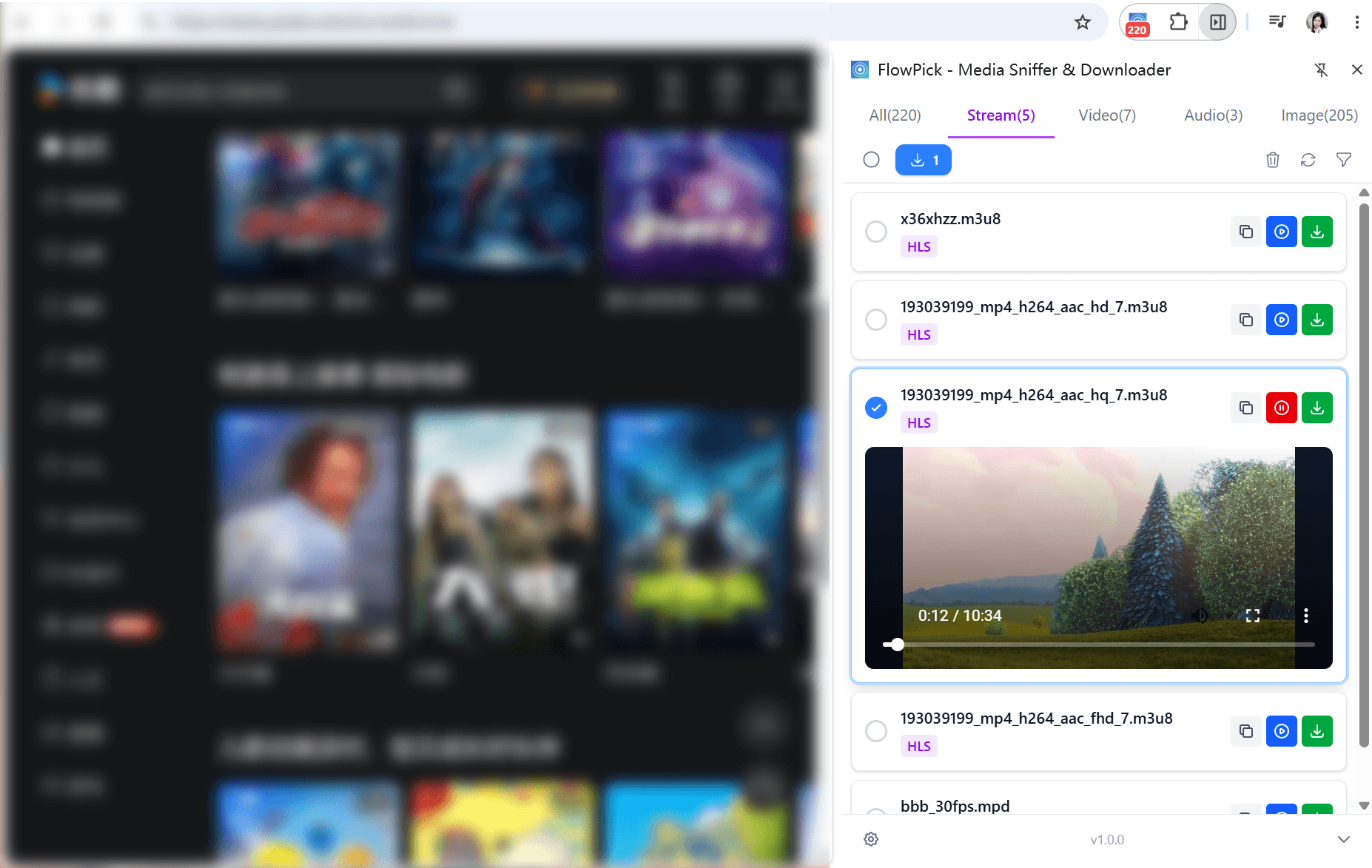
Step 4: Choose Your Quality
For adaptive streams, FlowPick reads the master M3U8 and shows all available quality options. Pick the resolution you want.
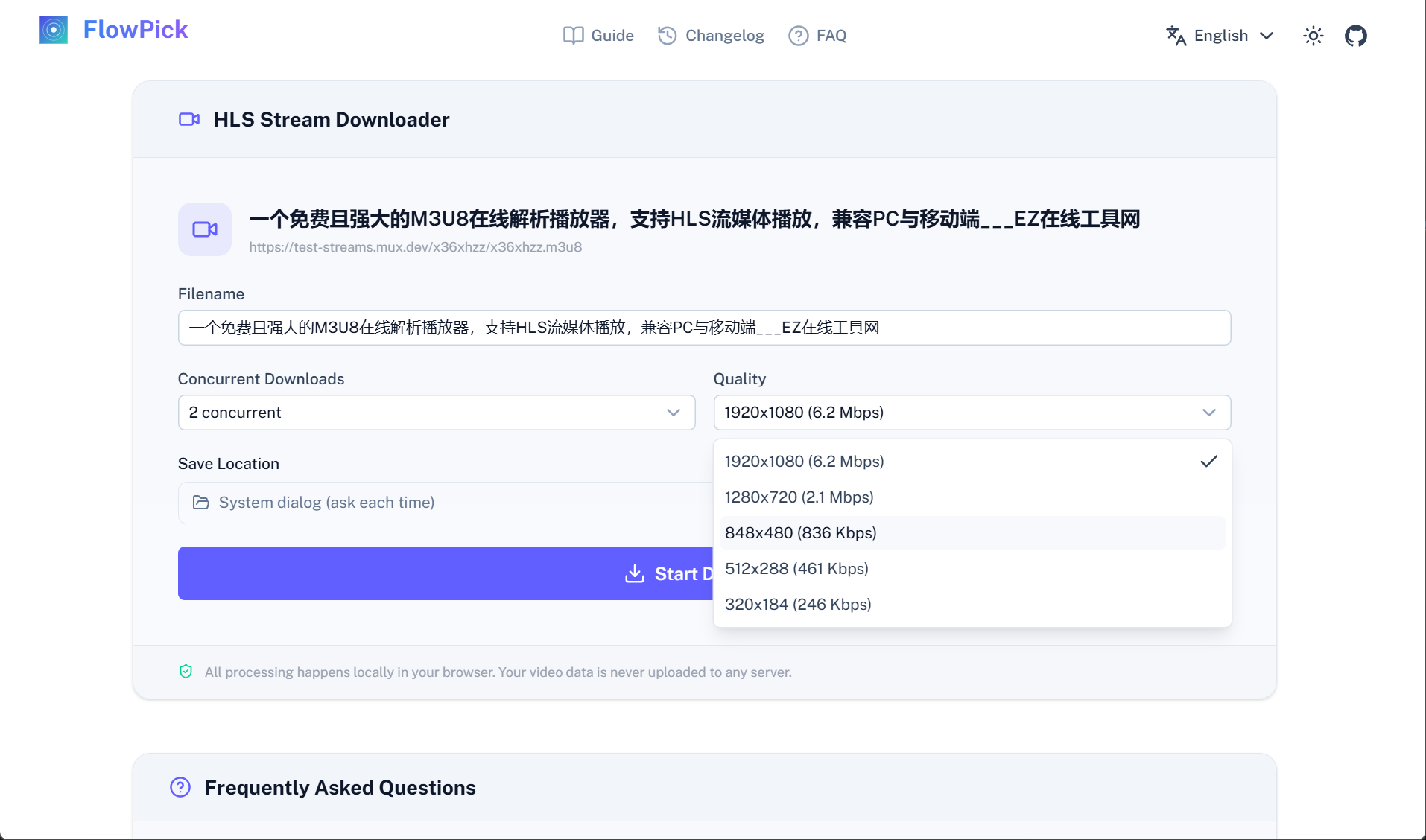
Step 5: Download and Merge
Click Pick. FlowPick downloads segments in parallel using your configured thread count (default 2, adjustable in settings), decrypts encrypted segments locally, and merges them into an MP4 or TS file (depending on your settings). Nothing goes through any server — files go directly from the CDN to your disk.
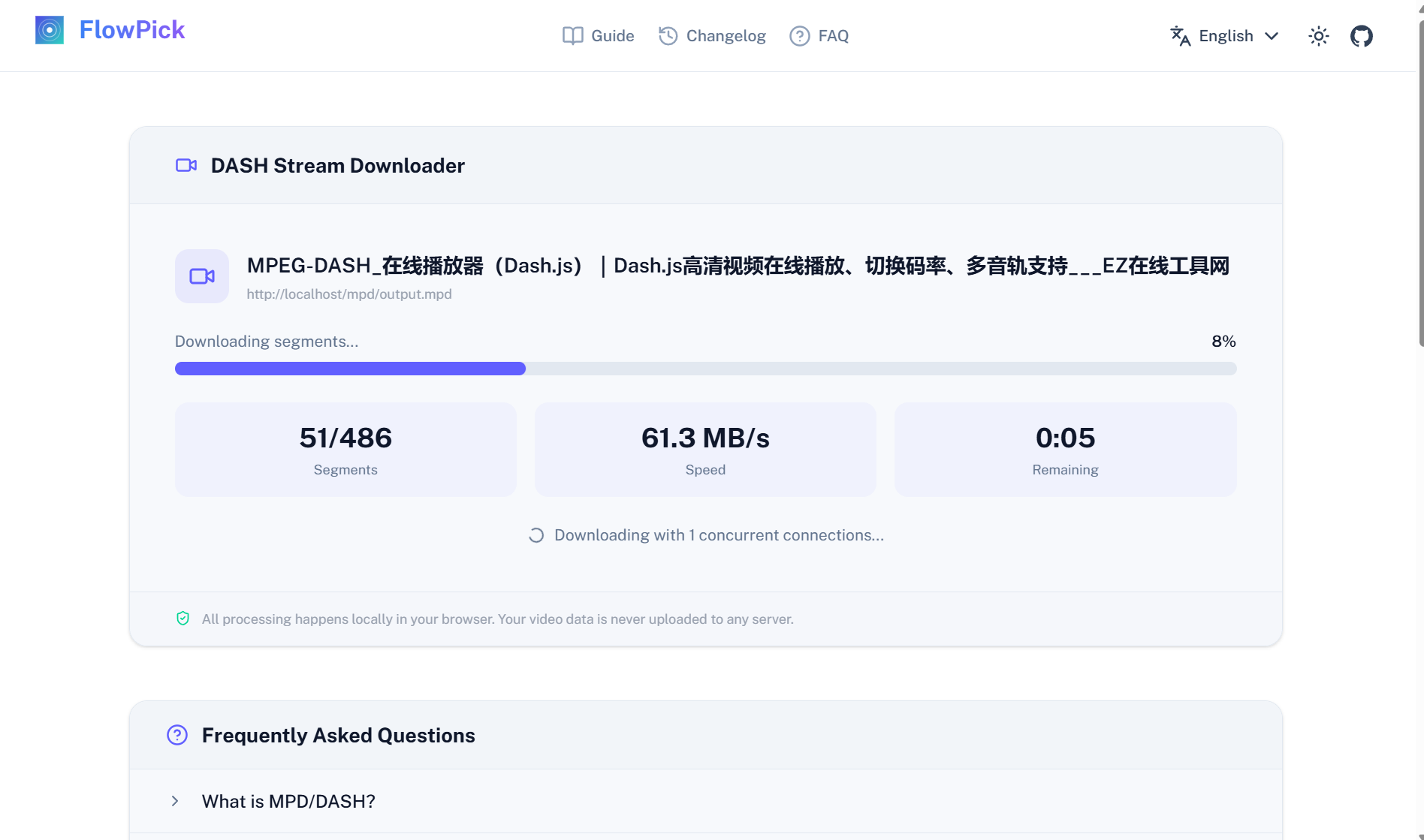
Download Progress
The bottom of the FlowPick popup shows real-time progress for the current download: segments downloaded / total segments, current speed, estimated time remaining. For long videos with hundreds of segments, the whole process usually takes just a few minutes.
Method 2: Online Tool (No Installation)
If you already have the M3U8 URL, you can use the M3U8 Online Downloader directly — no extension needed.
Paste the URL, pick a quality, click download. Works great for public streams, but some platforms have CORS restrictions (the extension has an edge here since it runs with the page's own credentials).
m3u8 → play the video → look for a request with Content-Type application/x-mpegurl.Output Format: MP4 or TS?
FlowPick supports two output formats, switchable in settings:
| MP4 | TS | |
|---|---|---|
| Compatibility | Best, supported by virtually all players | Some older players don't support it |
| Processing speed | Requires FFmpeg WASM remuxing, slightly slower | Direct binary concatenation, extremely fast |
| File size | 5-15% smaller than TS (less container overhead) | Slightly larger |
| Best for | Long-term storage, uploading, video editing | Speed, or if you plan to process further with FFmpeg |
For everyday use, go with MP4. Only consider TS if you plan to do further processing with FFmpeg command line, or if your connection is slow and you want to skip the remux step.
Encrypted Streams: AES-128
A lot of paid content uses encrypted HLS. The M3U8 will have a line like this:
#EXT-X-KEY:METHOD=AES-128,URI="https://api.example.com/key?token=abc123"
This means: each .ts segment is encrypted with a 128-bit AES key, and the key is fetched from that URI. Without the key, the raw segment bytes are meaningless.
FlowPick handles all of this automatically:
- Fetches the key from the URI (using the browser's cookies and session — so it works while logged in)
- Decrypts each segment client-side using the browser's built-in Web Crypto API
- Neither the key nor the segment data is ever sent to any external server
What FlowPick can't handle: Widevine, PlayReady, or FairPlay DRM. These are hardware-level content protection systems where decryption keys are bound to the device and inaccessible to JavaScript. Netflix and Disney+ fall into this category.
Real-World Use Cases
Online Course Platforms (Udemy, Coursera, etc.)
Most course platforms use encrypted HLS to prevent students from downloading and then refunding. FlowPick can handle AES-128 encryption — as long as you're logged in and have access.
Workflow: open the course video → let it play for 5 seconds → open FlowPick → pick 720P (plenty clear for course content, smaller file) → Pick. Once downloaded, play it back immediately to verify audio sync.
Livestream Replay Recording
After a livestream ends, there's usually a brief replay window (24-72 hours) before the platform deletes it or locks it behind a paywall. Downloading during this window is the cleanest — the stream is static, and URLs don't expire as rapidly as during a live broadcast.
How to tell: if it's a live broadcast, the M3U8 won't have the #EXT-X-ENDLIST tag. If that tag is present, the stream has ended and is a static, fully downloadable stream.
Content with Embedded Subtitles
Some platforms' HLS streams include multiple audio tracks, listed in the M3U8 with #EXT-X-MEDIA:TYPE=AUDIO. FlowPick detects and displays available audio tracks for you to choose from.
Common Troubleshooting
"0 streams detected"
Most common cause: the video hasn't started playing yet. M3U8 requests are only made when the player initializes. Hit play, wait a second or two for buffering, then check again.
If the site embeds the player in an iframe (embedded players, course platforms), right-click the video → "Open frame in new tab" and use FlowPick on that tab.
"Download stopped at X%"
Stream URLs expired. Most platforms' segment URLs are valid for 4-6 hours; live content may only last 30 minutes.
Fix: refresh the page, replay the video to get fresh URLs, then re-detect with FlowPick.
"Downloaded file won't play"
A few possibilities:
- Corrupted segment: a single bad
.tscan break the merge. Try a lower quality version. - Non-standard TS format: FlowPick uses FFmpeg WASM for remuxing, but edge cases exist.
- Audio/video out of sync: open in VLC, choose "Always fix" (Media → Convert/Save → Profile → Video codec → check "Fix/ignore corrupted or missing A/V sync").
"Only got a single .ts file"
This can happen on Firefox or when the merge step silently fails. Switch to Chrome or Edge — merge support is better there, as Chrome's File System Access API allows direct large file writes to disk.
Download speed is very slow
The default concurrency is 2 threads, which is conservative. In FlowPick settings, bump it to 4-6 — speed usually improves noticeably. Don't go too high — too many concurrent connections can trigger server-side rate limiting.
Large File Notes
FlowPick uses the browser's File System Access API for streaming writes, with theoretically no file size limit. 4K videos, multi-GB long-form content — no problem. The browser won't crash or run out of memory just because the file is large.
Chrome and Edge have the best large file support (full FSA streaming writes). Firefox also works but uses a different write strategy, with slightly less stability for very large files.
Quick Reference: HLS vs. the Other Format
If you're seeing .mpd files instead of .m3u8, you're dealing with DASH — a related but different streaming protocol. For a detailed breakdown, see What Is DASH Streaming? MPD File Explained.
Both can be handled by FlowPick. The workflow is essentially the same; the main difference is that DASH has separate audio and video tracks that need merging, which takes slightly longer.
Recommended Reading
- How FlowPick Merges Video Segments into MP4 in the Browser — what happens behind the download button; this breaks down the entire technical pipeline
- What Is DASH Streaming? MPD File Explained — the other major streaming protocol and its key differences from HLS
- How to Download Bilibili Videos to Your Computer — most Bilibili content uses DASH, livestreams use HLS
- How to Sniff and Download Audio from Any Website — HLS audio streams work with the same workflow
- How to Batch Download Images from Any Website — same extension, images can be batch-grabbed too
- FlowPick vs. Video DownloadHelper — a side-by-side comparison with the oldest extension in this space