
Audio Capture
FlowPick automatically detects audio content on webpages, supporting common streaming formats (HLS/DASH) and direct audio files. Audio resources are displayed in a dedicated tab in the popup window for easy filtering and download.
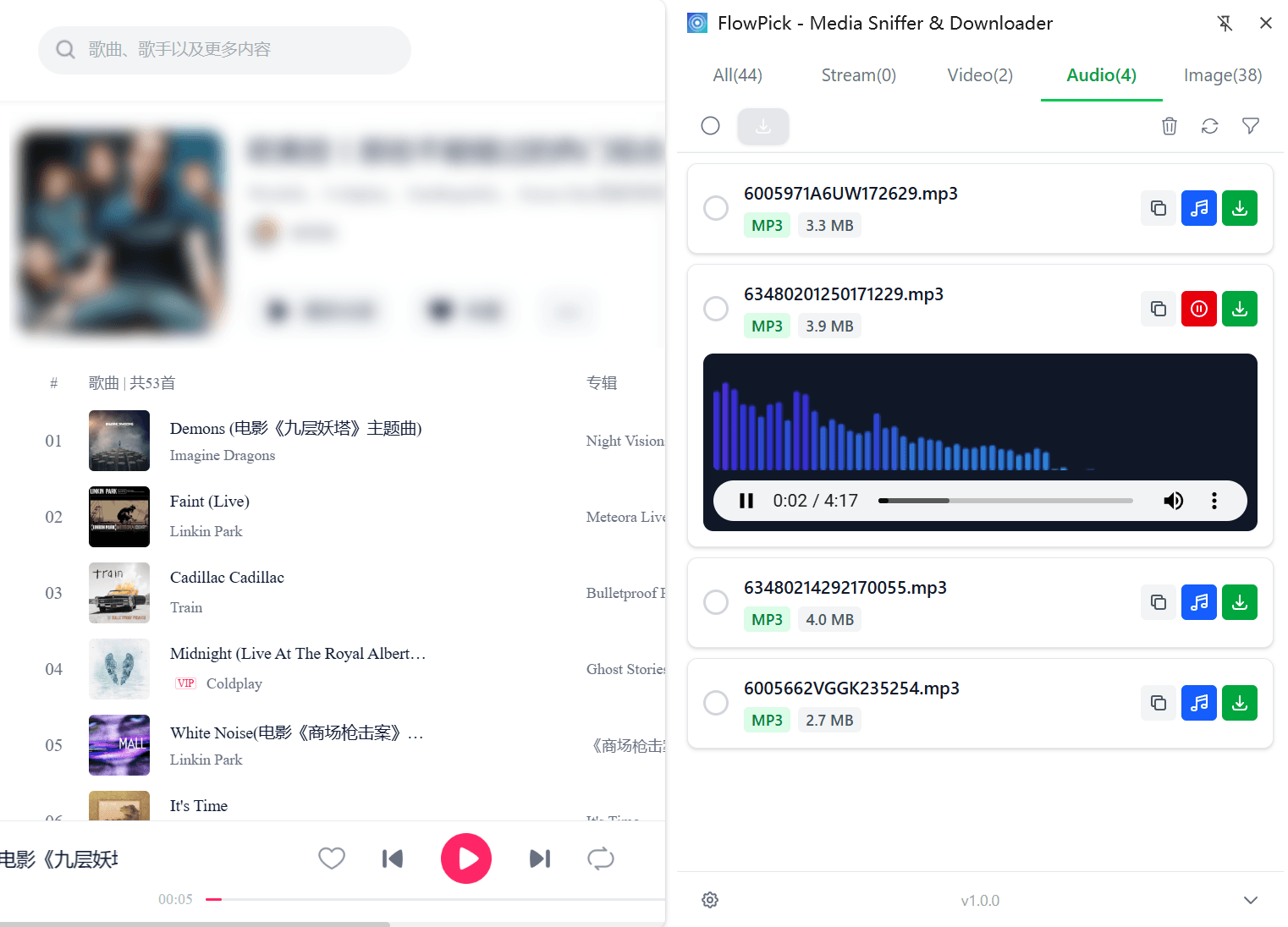
Detection Principles
Audio detection uses the same webRequest API as video detection:
Request Monitoring
Extension intercepts all network requests, identifies audio resources based on Content-Type.
Manifest Parsing
For HLS/DASH streams, parses manifest to extract audio track info.
Metadata Extraction
Extracts basic metadata from response headers (file size, format, etc.).
Resource Display
Detected audios are listed under the dedicated "Audio" tab.
Detection Timing:
- After extension installation, need to refresh target page before detection can begin
- Audio usually loads when user clicks play; recommend playing for a few seconds before opening extension
- Some websites use lazy loading; need to trigger playback before audio can be detected
Supported Audio Formats
Streaming Protocols
| Protocol | Manifest File | Content-Type | Description |
|---|---|---|---|
| HLS | .m3u8 | application/x-mpegurl | HLS audio stream |
| DASH | .mpd | application/dash+xml | DASH audio stream |
Direct Audio Files
| Content-Type | Extension | Description |
|---|---|---|
audio/mpeg | .mp3 | Most universal audio format |
audio/mp4 | .m4a | AAC container |
audio/webm | .weba | WebM audio |
audio/ogg | .ogg | Ogg Vorbis |
audio/wav | .wav | Uncompressed WAV |
audio/flac | .flac | Lossless FLAC |
audio/aac | .aac | Pure AAC |
audio/x-m4a | .m4a | iTunes audio |
Podcast Detection
Podcast platforms typically use standard audio formats (MP3/AAC), making them easy to detect with FlowPick.
Podcast Platform Support
| Platform | Format | Notes |
|---|---|---|
| Apple Podcasts | MP3/M4A | Standard RSS feed |
| Spotify | Encrypted | May not be directly detectable |
| Google Podcasts | MP3 | Standard format |
| Independent Podcasts | MP3/AAC | Usually direct links |
| YouTube Music | DASH/HLS | Video+audio separated |
Batch Download of Podcast Episodes
Podcast list pages often contain multiple episodes that can be downloaded in batches:
- Open podcast list page
- Play each episode briefly to trigger audio loading (some sites auto-load)
- Open FlowPick, switch to Audio tab
- Select needed episodes using checkboxes
- Click "Download Selected" button
Metadata Extraction
When detecting audio files, FlowPick extracts available metadata:
| Metadata | Source | Example |
|---|---|---|
| File Size | Content-Length header | 12.5 MB |
| MIME Type | Content-Type header | audio/mpeg |
| File Name | URL path inference | episode-001.mp3 |
| Source Domain | Request URL | cdn.example.com |
Limitations:
- Cannot extract ID3 tags (artist, album, duration) without downloading file
- Cannot get actual audio duration without parsing entire file
- Some servers don't return Content-Length header
Download Behavior
Direct Audio Files
For direct audio files (MP3, M4A, etc.):
- Browser downloads original file directly
- No conversion or processing needed
- File saved to default download directory
Streaming Audio
For HLS/DASH audio streams:
- Parse manifest to get fragment list
- Concurrently download all fragments
- Merge fragments into single file
- If output format is MP4/M4A, perform remuxing
Use Cases
Background Music Download
Many websites use background music (BGM):
- Game websites' background music
- Personal homepage's ambient music
- Product demo pages' background music
- Interactive media's sound effects
These audios are usually loaded when page opens, can be detected immediately after refreshing page.
Podcast Episode Collection
Collect favorite podcast episodes locally:
- Open episode page
- Play briefly to trigger audio load
- Detect and download in FlowPick
Audiobook Download
Audiobook platforms usually provide audio files:
- Usually standard MP3/M4A format
- Sometimes split into chapters
- Can be downloaded chapter-by-chapter
Live Stream Recording
Some live platforms provide recorded replay:
- Replays usually stored as standard audio files
- Can be detected and downloaded like regular audio files
- Some platforms use special protection
Best Practices
Filter Unwanted Resources
Audio detection may pick up some unwanted resources:
| Resource Type | How to Handle |
|---|---|
| Notification sounds | Filter by file size (usually very small) |
| Ad audio | Manually exclude or filter by domain |
| UI sound effects | Filter by file size |
| Background music | Decide whether to download based on needs |
Combine with Video Download
Some content has both video and audio versions:
- Podcasts sometimes have video versions
- Some courses provide separate video and audio tracks
- Choose appropriate type based on needs
File Naming
Downloaded audio files are named based on URL. If you want better naming:
- Manually rename after download
- Use file manager to batch rename
- Some download managers support custom naming rules
Troubleshooting
Audio Not Detected
| Cause | Solution |
|---|---|
| Page not refreshed | Refresh page and wait for audio to load |
| Audio not played | Click play button, play for a few seconds |
| Uses Web Audio API | Some sites use programmatic audio generation, not network requests |
| Encrypted stream | DRM-protected audio cannot be detected |
Downloaded File Cannot Play
| Cause | Solution |
|---|---|
| Incomplete download | Re-download, ensure network stable |
| Unsupported format | Try converting with FFmpeg or other tools |
| Corrupted file | Original file may have issues |
File Size Shows as Unknown
Some servers don't return Content-Length header:
- This is normal, doesn't affect download
- Actual size only known after download completes
- Streaming audio especially prone to this situation
Related Documentation
- Video Sniffing — Video detection and download (similar principles)
- Image Download — Image resource detection and download
- Batch Download — Multi-resource batch download operations
- Format Conversion — Audio format conversion and remuxing
- Usage Guide — Basic operation steps
- Configuration Reference — Filter settings and download options
- Privacy & Security — Network monitoring privacy notes
- Common Issues Troubleshooting — Diagnostic methods for issues
- Known Limitations — Technical limitations
Video Sniffing
Complete technical documentation for FlowPick video detection and download, covering HLS, DASH, direct video files, encrypted stream decryption, and troubleshooting.
Image Download
Complete technical documentation for FlowPick image detection and download, covering supported formats, smart filtering, batch download, gallery scenarios, and best practices.