
FAQ
This document collects the most frequently asked questions during FlowPick usage. If your issue isn't listed here, please refer to Common Issues Troubleshooting or provide feedback via GitHub Issues.
Quick Navigation
| Category | Question Count | Jump To |
|---|---|---|
| Installation & Setup | 4 | Installation & Setup |
| Media Detection | 3 | Media Detection |
| Download-Related | 5 | Download-Related |
| Format Conversion | 3 | Format Conversion |
| Privacy & Security | 3 | Privacy & Security |
| Technical Questions | 3 | Technical Questions |
| Other Questions | 4 | Other Questions |
Installation & Setup
Is FlowPick free?
The browser extension and local tools are free to use. Optional account and cloud-transfer features have the plans and usage limits shown in the product. The extension source code is available on GitHub.
Why does the extension need "Read and change website data" permission?
FlowPick needs to monitor network requests to detect media resources on pages. This permission is only used for:
- Monitoring network requests from browser to identify video, audio, and image URLs
- Initiating download requests when user actively clicks download
FlowPick doesn't collect, upload, or share your browsing data.
Can I use it on Firefox?
Firefox extension version is under development. Currently you can use online tools on Firefox (/m3u8-downloader, /dash-downloader), but functionality limited by Firefox's support for File System Access API and SharedArrayBuffer.
How do I update to latest version?
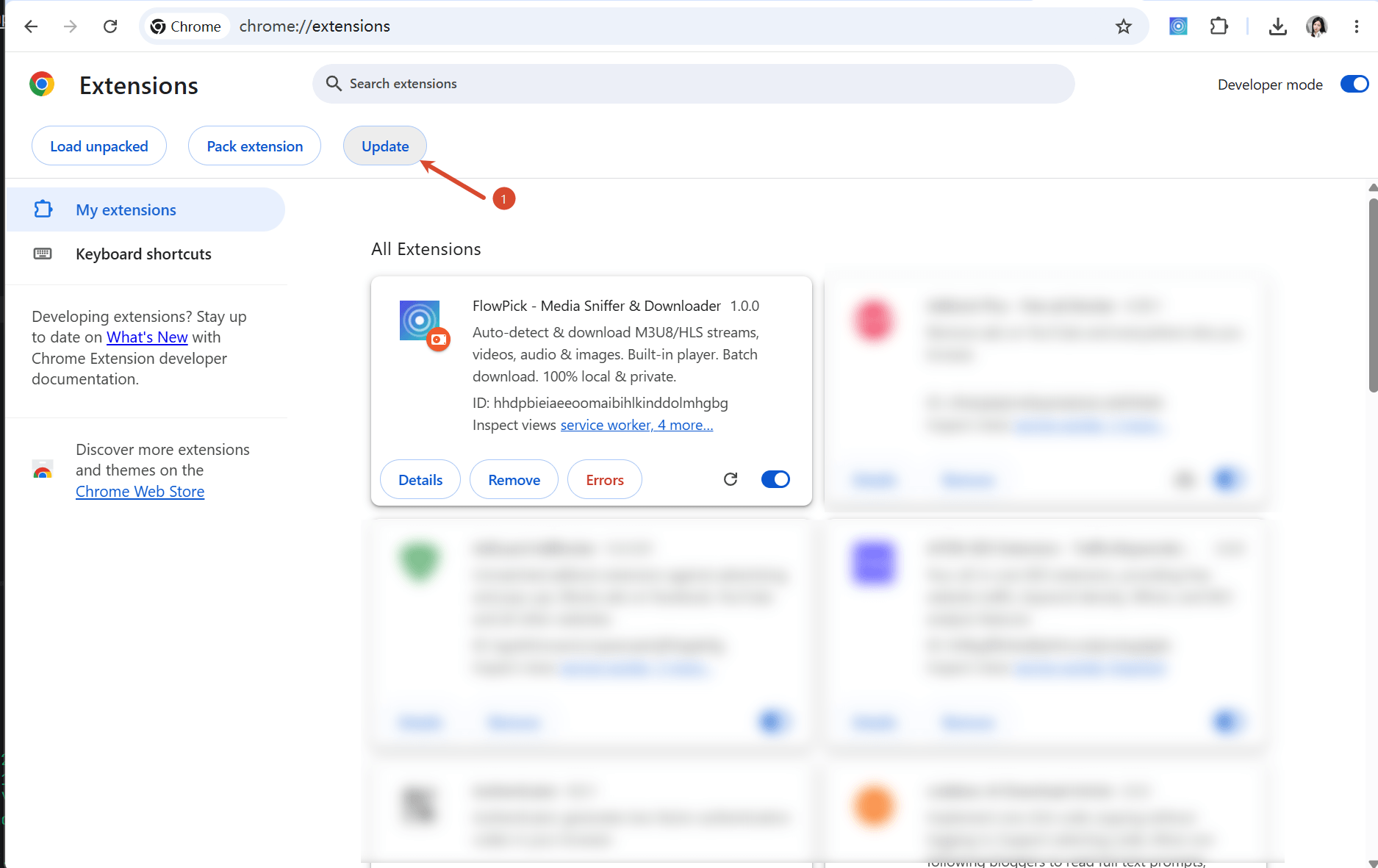
Chrome/Edge extensions auto-update. You can also manually check for updates:
- Open
chrome://extensions(Edge:edge://extensions) - Enable "Developer mode" in top-right corner
- Click "Update" button
Media Detection
Why can't video on page be detected?
Most common causes and solutions:
- Page hasn't loaded media yet: Play video for a few seconds first, then refresh page and reopen FlowPick
- Extension activated after page loaded: Refresh page so extension re-monitors network requests
- Website uses MSE dynamic loading: Some websites push data dynamically via Media Source Extensions; may not be detectable through regular network request monitoring
- Media in iframe: Media in cross-origin iframes may not be detectable
Too many files detected, how to filter?
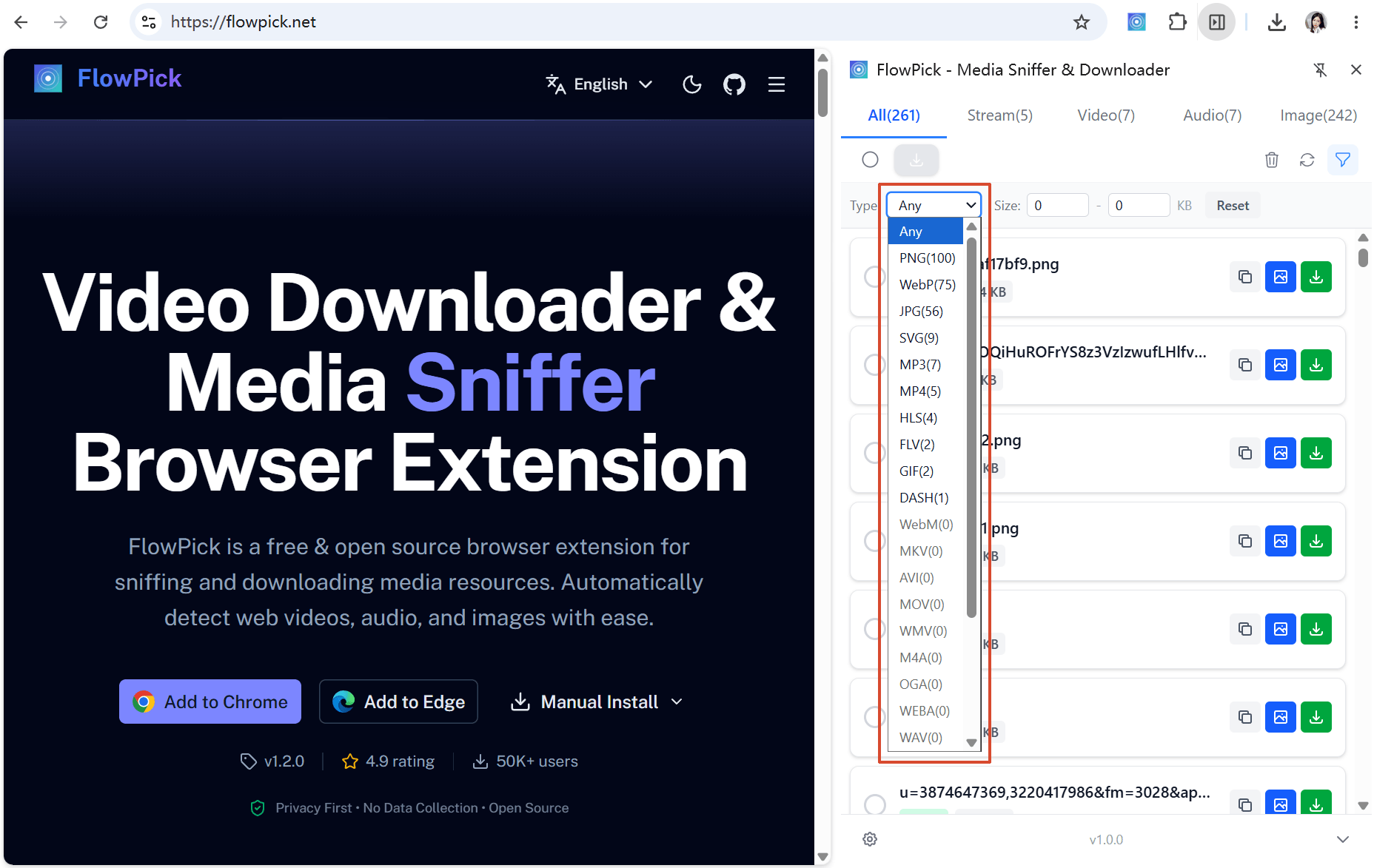
Use filtering features in FlowPick popup:
- Type filter: Switch between Video/Audio/Image tabs
- Size filter: Set minimum file size to exclude thumbnails and small icons
- Format filter: Filter by file extension (e.g., show only
.mp4)
Why does same video appear multiple times?
Streaming typically contains multiple quality versions (e.g., 720p, 1080p, 4K); each version displays as separate entry. Select desired quality to download. If using M3U8 stream with Master Playlist, FlowPick shows quality list for selection.
Download-Related
What to do about slow download speed?
Factors affecting download speed and optimization suggestions:
| Factor | Optimization Method |
|---|---|
| Concurrent thread count too low | Increase to 4-6 in settings |
| CDN throttling | Reduce concurrency to avoid triggering rate limiting |
| Insufficient network bandwidth | Close other bandwidth-consuming apps |
| Segment server far away | Cannot optimize; depends on streaming service provider |
Downloaded file won't play?
Troubleshoot with these steps:
- Check file size: If file significantly smaller than expected (e.g., only few KB), download incomplete
- Check format: Confirm player supports format (TS format requires VLC or PotPlayer)
- Check encryption: If encrypted stream key fetch fails, file cannot be decrypted
- Try remuxing: Convert TS to MP4 before playing
Can I download multiple files simultaneously?
Yes. Check multiple resources in popup and click "Download Selected"; they will download sequentially one by one.
Can I resume interrupted downloads?
The current page can recover an interrupted transfer without discarding completed work:
- Transient network, HTTP 419/429, and server failures are retried automatically with exponential backoff
- If automatic retries are exhausted, keep the page open and select Resume to retry the failed segment or byte range
- Completed HLS/DASH segments and direct-video byte ranges remain available while that download task and tab stay open
This is an in-tab recovery feature, not persistent cross-session resume. Refreshing or closing the page still discards the task checkpoint and starts a later download from the beginning.
Why No Cross-Session Resume?
Resumable downloads require persisting downloaded segment data to disk and continuing from breakpoint on recovery. This faces two main challenges in browser environment:
- Storage and integrity limitations: Browser storage has quota limits, and a durable checkpoint must verify every partially written track before appending
- Segment URL expiration: Streaming segment URLs usually contain time-sensitive tokens; even short interruption causes token expiration, preventing remaining segments from downloading even if resumed
Where are downloaded files saved?
Depends on browser settings and selected save method:
- Chrome default: Browser's default download directory (usually "Downloads" folder)
- Select directory mode: Folder specified through directory picker
- Ask every time: Save dialog pops up each time you download
Format Conversion
What's the difference between TS and MP4?
| Feature | TS | MP4 |
|---|---|---|
| Full Name | MPEG Transport Stream | MPEG-4 Part 14 |
| Designed For | Streaming transmission | Local storage and playback |
| Playback Compatibility | Requires professional players like VLC/PotPlayer | Almost all players supported |
| File Size | Slightly larger (includes transport overhead) | Slightly smaller |
| Download Speed | Fast (no remuxing needed) | Requires remuxing; time depends on source and device |
Recommendation: If player supports TS format, selecting TS output skips remuxing step for faster downloads.
Why does remuxing take a long time?
The current browser merge pipeline uses mux.js and Mediabunny, not FFmpeg WASM. Time depends on segment count, track and timeline processing, input/output storage, and whether a dedicated converter needs re-encoding. Check the task stage, test a small sample, and avoid several large jobs at once.
See Format conversion and Download engine.
What to do when remuxing fails?
Distinguish downloading, parsing, merging, and saving. Check whether the source expired, segments and initialization data are complete, codecs are supported, and storage and save permissions are available. Remuxing cannot restore missing content; retries cannot bypass DRM or source access controls.
See Common issues and Known limitations.
Privacy & Security
Does FlowPick collect my data?
The extension has no analytics SDK, and the normal download workflow processes media locally:
- Media detection happens inside extension; no data uploaded
- File downloads directly from source server to your disk
- Accounts are optional website services and are not required for the local workflow
- The website may use analytics as described in the Privacy Policy
- A source is sent to FlowPick infrastructure only when you explicitly choose cloud transfer
Are there copyright issues with downloaded content?
Use FlowPick only for media you created, are authorized to save, or whose license permits downloading:
- Only download content you have right to access and use
- Comply with website terms of service
- Do not bypass DRM, paywalls, sign-in requirements, or access controls
- Do not redistribute media unless its license or rights holder permits it
Are online tools safe?
The normal processing path for /m3u8-downloader and /dash-downloader runs in the browser:
- Pasted URLs are requested by the browser in the local workflow
- Downloaded data transfers directly from source server to your disk
- Local merging runs in the browser; files are not uploaded to FlowPick
- If you explicitly choose a cloud-transfer option, the submitted source is processed by FlowPick infrastructure instead
Technical Questions
What is SharedArrayBuffer, why is it needed?
SharedArrayBuffer allows threads to share memory and is subject to browser secure-context and cross-origin-isolation requirements. Check crossOriginIsolated, permissions, and console errors for the specific tool. The current merge path does not use FFmpeg WASM, so a missing shared buffer does not trigger an FFmpeg single-thread fallback.
Why do online tools require pasting URL instead of auto-detecting?
Browser extensions can monitor network requests, but ordinary web pages restricted by same-origin policy cannot access other tabs' network request data. Online tools run as ordinary web pages, requiring you to manually provide streaming URL.
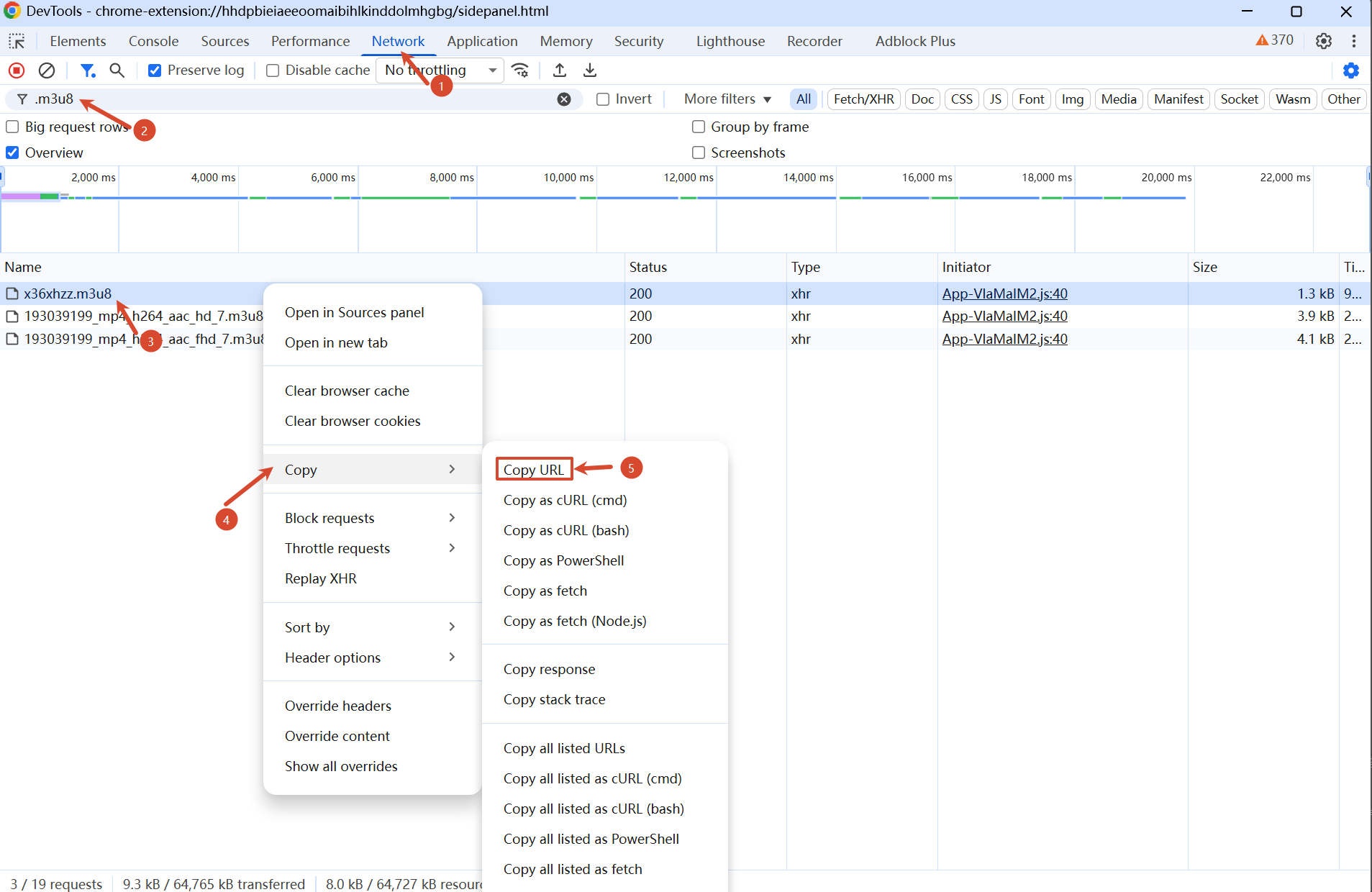
How to Get Streaming URL?
- Press
F12to open Developer Tools - Switch to Network panel
- Type
m3u8ormpdin filter box - Play video, observe appearing requests
- Right-click M3U8/MPD request → Copy → Copy link address
What's the difference between extension version and online tools?
| Feature | Extension Version | Online Tools |
|---|---|---|
| Auto-detect media | Supported | Not Supported |
| CORS restrictions | Not restricted | Restricted |
| Installation required | Need install extension | No installation needed |
| Ease of use | One-click detect & download | Manually obtain URL needed |
| Use case | Daily usage | Temporary use, environments where extension can't be installed |
Other Questions
Is this project open source?
Yes, FlowPick is open source on GitHub. You can view source code, submit issues, or contribute code.
How do I report bugs?
Submit bug reports via GitHub Issues, please include:
- Browser type and version
- Operating system
- Issue description and reproduction steps
- Console error log (F12 → Console)
- Relevant streaming URL (if publicly accessible)
How do I request new features?
Submit feature requests via GitHub Issues, please describe:
- Feature you want implemented
- Use case
- Expected behavior
Can I self-deploy the online tools?
Yes. FlowPick is a Nuxt application; you can clone repository and build/deploy yourself. Note:
- Configure COEP/COOP for the specific capabilities that require cross-origin isolation
- StreamSaver.js's
mitm.htmland Service Worker must be correctly deployed - Recommend using Cloudflare Pages or Vercel or similar platforms supporting custom response headers
Related Documentation
- Common Issues Troubleshooting — Diagnostic steps and solutions organized by symptom
- Known Limitations — Current version technical limitations and edge cases
- Installation Guide — Extension installation and activation
- Configuration Reference — Concurrency, filter, and other settings
- Video Sniffing — HLS/DASH manifest parsing and encryption detection
- Image Download — Image detection and download features
- Format Conversion — Browser media processing and output formats
- Batch Download — Queue scheduling and concurrency control
- Download Engine Architecture — Complete technical architecture of download engine
- Browser Compatibility — Browser API support and degradation strategies
- Online Tools — Online tool usage and limitations
- Privacy & Security — Permission explanation and privacy protection
- Contributing Guide — How to report bugs and contribute code
- Online Course Download — Online course download scenarios
- Image Gallery Batch Download — Batch image download scenarios