
Configuration Reference
FlowPick provides extensive configuration options covering download behavior, filtering rules, storage strategy, and interface preferences. This document explains the purpose, default values, and applicable scenarios for each configuration item.
Quick Reference
| Configuration | Default | Available Range | Section |
|---|---|---|---|
| Concurrent Threads | 2 | 1 ~ 8 | Download Settings |
| Output Format | MP4 | MP4 / TS | Download Settings |
| Save Directory | System default | Custom directory | Download Settings |
| Auto Detection | Off | On / Off | Filtering Settings |
| Minimum File Size | 0 KB | Any positive integer | Filtering Settings |
| Minimum Duration | 0 seconds | Any positive integer | Filtering Settings |
| Theme Mode | Follow system | Follow system / Light / Dark | Interface Settings |
| Download Notification | On | On / Off | Interface Settings |
| Max Retry Count | 3 | Built-in fixed | Advanced Settings |
| Blob Mode Limit | 1500 MB | Built-in fixed | Advanced Settings |
Configuration Access Points
Configuration is divided into two levels to adapt to different usage scenarios:
| Level | Access Point | Scope | Storage Location |
|---|---|---|---|
| Extension Settings | Click gear icon in popup | Global defaults, affects detection and download behavior on all pages | chrome.storage.sync |
| Download Panel | Online tool pages (M3U8/DASH downloader) | Temporary parameters for single download session, overrides global defaults | Tab memory |
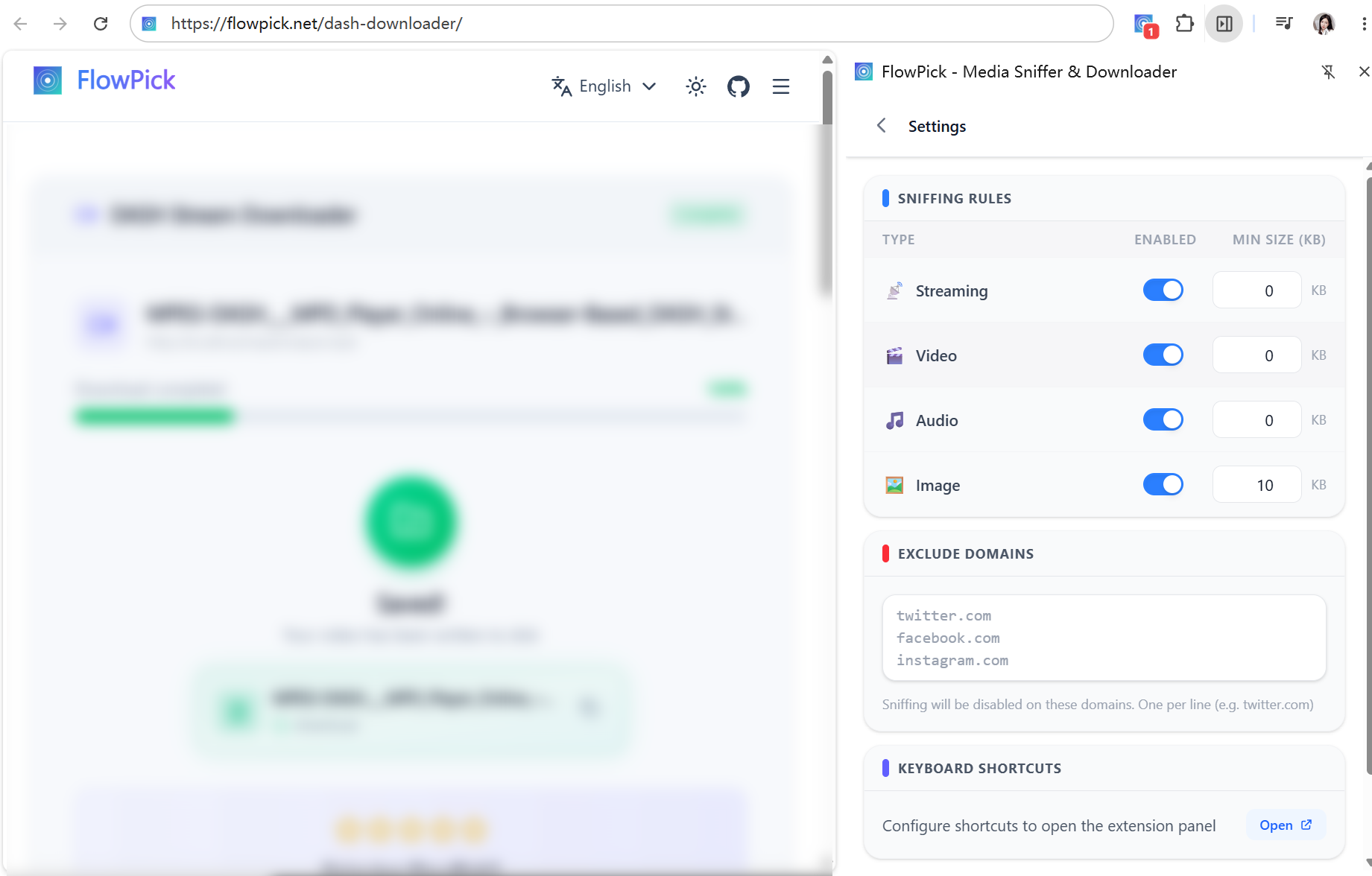
Storage and Synchronization:
- Extension settings are saved in
chrome.storage.syncand auto-sync to other devices after signing into Chrome account - Download panel configuration exists only in current tab session; defaults restore after page refresh
- Save directory name is cached in
localStorageunder the keyflowpick_save_dir_name; does not sync across devices
Download Settings
Concurrent Threads
Controls the number of fragments downloaded simultaneously. Higher concurrency increases download speed but also consumes more network bandwidth and browser memory.
| Attribute | Value |
|---|---|
| Default | 2 |
| Range | 1 ~ 8 |
| Recommended | Normal network 2-4, high-speed network 4-6 |
Selection Guide:
| Thread Count | Use Case | Notes |
|---|---|---|
| 1-2 | Unstable network, limited bandwidth, mobile hotspot | Most stable but slowest speed |
| 3-4 | Balanced choice for most scenarios | Balances speed and stability |
| 5-6 | High-speed broadband, large file downloads | Note some CDNs limit per-IP concurrency |
| 7-8 | Ultra-fast networks, many fragments | May trigger CDN rate limiting or browser connection limits |
Actual concurrency won't exceed total fragment count. For example, if there are only 3 fragments, even if set to 8, only 3 download tasks will start.
Output Format
Output container format after merging stream fragments.
| Format | Extension | MIME Type | Merge Speed | Compatibility | File Size |
|---|---|---|---|---|---|
| MP4 | .mp4 | video/mp4 | Slower (requires remuxing) | All devices and players | Smaller |
| TS | .ts | video/mp2t | Fastest (direct concatenation) | Some players don't support it | Larger |
Selection Guide:
- Need maximum compatibility (players, editing software, sharing with others) → Choose MP4
- Want fastest merge speed, will transcode with other tools later → Choose TS
- Source stream is already TS encapsulated and doesn't need secondary processing → Choose TS
When outputting MP4, FlowPick automatically adds -movflags +faststart flag to place moov atom at the front, allowing video to start playing before download completes (useful for progressive download scenarios).
Save Directory
FlowPick supports two file saving strategies:
Strategy 1: Browser Default Download Directory
Without setting a save directory, all files are saved through the browser's Downloads API to the system's default download folder. No additional confirmation needed per download.
Strategy 2: Custom Save Directory (File System Access API)
Click "Choose Save Directory" button in download panel, authorize a folder, then all subsequent downloads write directly to that directory without showing save dialogs.
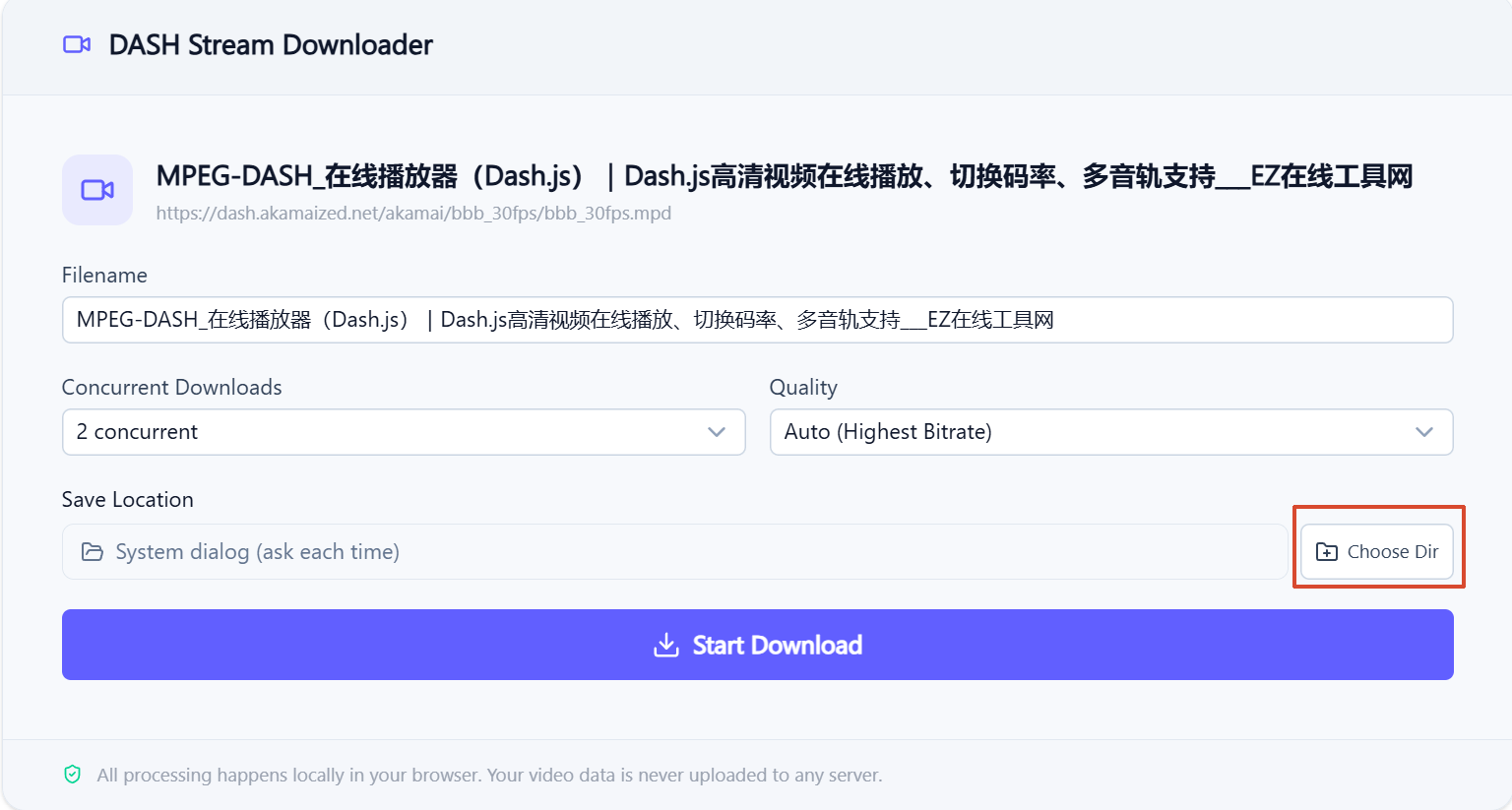
| Feature | Default Download Directory | Custom Save Directory |
|---|---|---|
| User Confirmation Required | No | Only first-time authorization |
| Cross-session Persistence | Yes (browser managed) | Yes (localStorage caches directory name) |
| Large File Support | Limited by browser | Depends on disk, device and processing |
| Browser Requirements | All browsers | Chrome 86+, Edge 86+ |
| Cross-device Sync | No | No |
Directory Permission Notes:
- Authorization status is silently checked via
navigator.permissions.query(), no repeated popups - If permission is revoked (user manually removes in system settings), FlowPick auto-falls back to dialog mode
- Directory name is cached in
localStorageunder keyflowpick_save_dir_name, used only for UI display - Custom directories don't sync across devices; each device needs separate authorization
Filename
Naming rules for downloaded files:
- Defaults to video page title or filename portion from stream URL
- Supports manual editing—modify in filename input field in download panel
- Special characters (such as
\/:*?"<>|) are automatically replaced with underscores - If same-named file exists in target directory, browser auto-adds numeric suffix (e.g.,
video (1).mp4)
Filtering Settings
Auto Detection
Controls whether extension auto-scans media resources when page loads.
| Option | Behavior | Use Case |
|---|---|---|
| On | Starts sniffing immediately after page loads, detected resources appear automatically in popup | Users who frequently visit video sites |
| Off | Triggers detection only when user clicks extension icon | Occasional users, privacy-conscious users |
Enabling auto-detection slightly increases CPU usage during page load, but typically negligible.
Minimum File Size
Filters out resources smaller than specified threshold, used to skip ad segments, thumbnails, and placeholder images.
| Attribute | Value |
|---|---|
| Default | 0 (no filtering) |
| Unit | KB |
| Recommended | Video 500 KB, Audio 100 KB, Image 50 KB |
Typical Scenarios:
| Scenario | Recommended Threshold | Filter Target |
|---|---|---|
| Video sites | 500 KB | 2-5 second ad segments |
| Gallery sites | 50 KB | Thumbnails and preview images |
| HLS streams | 1 KB | Encrypted key files (16 bytes) |
| Podcast sites | 100 KB | Preview clips |
Filter by Type
Filter displayed results by media type in popup:
| Option | Shows |
|---|---|
| All | All detected resources |
| Video | Only video and streaming resources (MP4, TS, M3U8, MPD) |
| Audio | Only audio resources (MP3, AAC, M4A, OGG) |
| Image | Only image resources (JPG, PNG, WebP, SVG, AVIF) |
Filter by Duration
Applies only to video and audio resources. Setting minimum duration filters out very short clips.
| Attribute | Value |
|---|---|
| Default | 0 seconds (no filtering) |
| Recommended | 5 seconds |
Interface Settings
Theme Mode
| Mode | Description |
|---|---|
| Follow System | Auto-switches based on OS dark/light mode |
| Light Mode | Always uses light theme |
| Dark Mode | Always uses dark theme |
Defaults to follow system preference. Setting saved in chrome.storage.sync, syncs with account.
Notifications
Controls desktop notification behavior after download completion:
| Option | Behavior |
|---|---|
| On | Shows system notification when download completes, includes filename and save path |
| Off | Shows completion status in popup only, no system notification |
Notifications use browser Notifications API, requests permission on first use. If notification permission was denied, can re-enable in browser settings.
Advanced Settings
Quality Selection Strategy
For adaptive streams (HLS Master Playlist / DASH MPD), FlowPick provides two quality selection methods:
| Strategy | Behavior |
|---|---|
| Auto (Highest Bitrate) | Auto-selects highest bitrate stream, usually corresponds to best quality |
| Manual Selection | Manually select from parsed quality list, displays resolution and bitrate info |
Quality list sorted from high to low bitrate, display format: 1080p · 5.2 Mbps · avc1.640028.
Retry Strategy
Automatic retry mechanism when fragment download fails:
| Parameter | Value |
|---|---|
| Max Retry Count | 3 |
| Backoff Strategy | Exponential backoff, delay = 2^attempt × 400ms |
| Retry Interval | 1st: 400ms, 2nd: 800ms, 3rd: 1600ms |
Retry only applies to temporary network-level failures (timeouts, connection resets). HTTP 4xx errors (such as 403, 404) won't trigger retry; error reports immediately.
Memory Safety Limits
To prevent browser crashes due to insufficient memory, FlowPick has built-in memory protection mechanisms:
| Parameter | Value | Description |
|---|---|---|
| Blob Mode Limit | 1500 MB | Files exceeding this size rejected from Blob mode |
| Warning Threshold | 800 MB | Prints warning to console when exceeded |
| Streaming Write High Watermark | 16 MB | Internal buffer size for FSA streaming writes |
When estimated file size exceeds Blob limit, FlowPick forces use of File System Access API or StreamSaver streaming writes to avoid loading entire file into memory.
Fragment Size Estimation
Before starting download, FlowPick samples to estimate total file size:
- Sample count:
min(5, max(1, totalSegments × 0.1)) - Estimation formula:
avgSampleSize × totalSegments - Used to determine whether to enable streaming write mode
Scenario-Based Configurations
Based on different usage scenarios, we recommend the following configuration combinations:
Daily Video Download
Default configuration suitable for most users:
| Configuration | Recommended Value |
|---|---|
| Concurrent Threads | 3 |
| Output Format | MP4 |
| Auto Detection | On |
| Minimum File Size | 500 KB |
Large File/Live Replay
Downloading live replays or long videos over 5GB:
| Configuration | Recommended Value |
|---|---|
| Concurrent Threads | 4-6 |
| Output Format | MP4 |
| Save Directory | Custom directory (FSA) |
| Auto Detection | Off |
Gallery Batch Download
Batch downloading images from gallery websites:
| Configuration | Recommended Value |
|---|---|
| Minimum File Size | 50 KB |
| Filter by Type | Images only |
| Auto Detection | On |
Podcast/Audio Download
Downloading podcast episodes or audio files:
| Configuration | Recommended Value |
|---|---|
| Concurrent Threads | 2 |
| Minimum File Size | 100 KB |
| Filter by Duration | 30 seconds |
| Filter by Type | Audio only |
Mobile Hotspot/Data Saving
Using mobile hotspot or limited data:
| Configuration | Recommended Value |
|---|---|
| Concurrent Threads | 1 |
| Quality Selection | Manually select low quality (360p/480p) |
| Auto Detection | Off |
Reset Configuration
To restore all settings to default values:
- Open extension popup
- Click gear icon to enter settings
- Click Clear All Data
- Confirm operation
This operation clears:
- All extension configuration in
chrome.storage.sync - Cached save directory name in
localStorage - Filter presets and theme preferences
Unaffected Data:
- Browser download history
- Files already downloaded locally
- Extension itself (won't be uninstalled)
Related Documentation
- Installation Guide — Extension installation and initial setup
- Usage Guide — Daily usage guide
- Format Conversion — Detailed technical explanation of output formats
- Video Sniffing — Media detection principles and encryption handling
- Download Engine Architecture — Concurrency control, retry strategy, memory management
- Browser Compatibility — API support and fallback strategies across browsers
- Common Issues Troubleshooting — Diagnostic methods for configuration issues
- Known Limitations — Differences between remuxing and transcoding
- Use Cases — Scenario-based configurations
- Privacy & Security — Auto-detection and privacy notes
Usage Guide
Complete usage guide for FlowPick, covering both extension and online tool methods, from basic detection to advanced download strategies.
Video Sniffing
Complete technical documentation for FlowPick video detection and download, covering HLS, DASH, direct video files, encrypted stream decryption, and troubleshooting.