
Video Sniffing
FlowPick automatically detects video content on webpages by monitoring browser network requests, supporting streaming protocols (HLS/DASH) and direct video files, with automatic decryption of AES-128 encrypted streams.
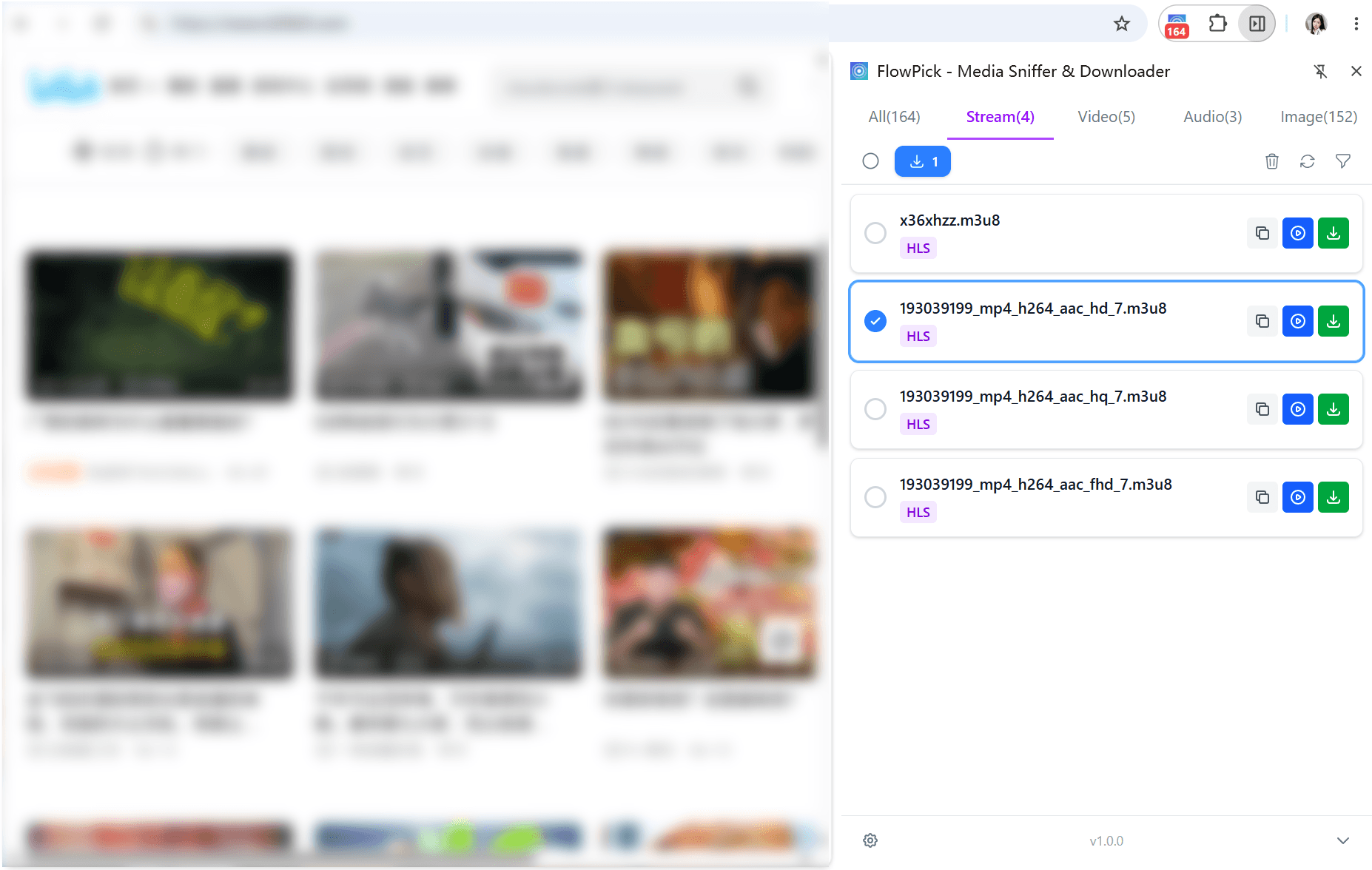
Detection Principles
FlowPick's video detection is based on the Chrome extension's webRequest API, intercepting requests at the browser network layer:
Network Interception
Extension listens to all network requests via webRequest.onBeforeRequest, identifying video and streaming resources based on response Content-Type headers.
Manifest Parsing
For HLS (.m3u8) and DASH (.mpd), automatically downloads and parses manifest files to extract available stream information.
Quality Analysis
Parses all available resolution and bitrate options from Master Playlist.
Encryption Detection
Checks for presence of EXT-X-KEY (HLS) or ContentProtection (DASH) tags to determine if decryption is needed.
Resource Display
Detected videos are displayed categorized by type in popup window.
Detection Timing:
- After extension installation, need to refresh target page before detection can begin
- Streaming manifests typically load when video starts playing; recommend playing for 3-5 seconds before opening extension
- For dynamically loaded videos (e.g., loading when scrolling to specific position), need to trigger loading before detection
webRequest API permissions and Manifest V3 limitations, see Known Limitations — Manifest V3 Limitations. For complete troubleshooting flow when media is not detected, see Common Issues Troubleshooting — Media Detection Issues.Supported Video Formats
Streaming Protocols
| Protocol | Manifest File | Content-Type | Description |
|---|---|---|---|
| HLS | .m3u8 | application/x-mpegurl | Apple HTTP Live Streaming, most common streaming protocol |
| HLS | .m3u8 | application/vnd.apple.mpegurl | Apple-specific MIME type for HLS |
| DASH | .mpd | application/dash+xml | MPEG-DASH, commonly used for high-quality content |
Direct Video Files
| Content-Type | Extension | Description |
|---|---|---|
video/mp4 | .mp4 | Most universal video format |
video/x-m4v | .mp4 | iTunes video format |
video/webm | .webm | Open-source Web video format |
video/ogg | .ogv | Ogg container video |
video/x-flv | .flv | Flash Video (legacy format) |
video/x-matroska | .mkv | Matroska container |
video/quicktime | .mov | Apple QuickTime |
video/x-msvideo | .avi | Windows AVI |
video/3gpp | .3gp | Mobile device video |
video/3gpp2 | .3g2 | CDMA mobile device video |
video/mpeg | .mpeg | MPEG video |
HLS (M3U8) Streams
HLS (HTTP Live Streaming) is a streaming protocol developed by Apple and currently the most widely used video transmission method on the web. Major platforms like Bilibili, Tencent Video, and Youku all use HLS.
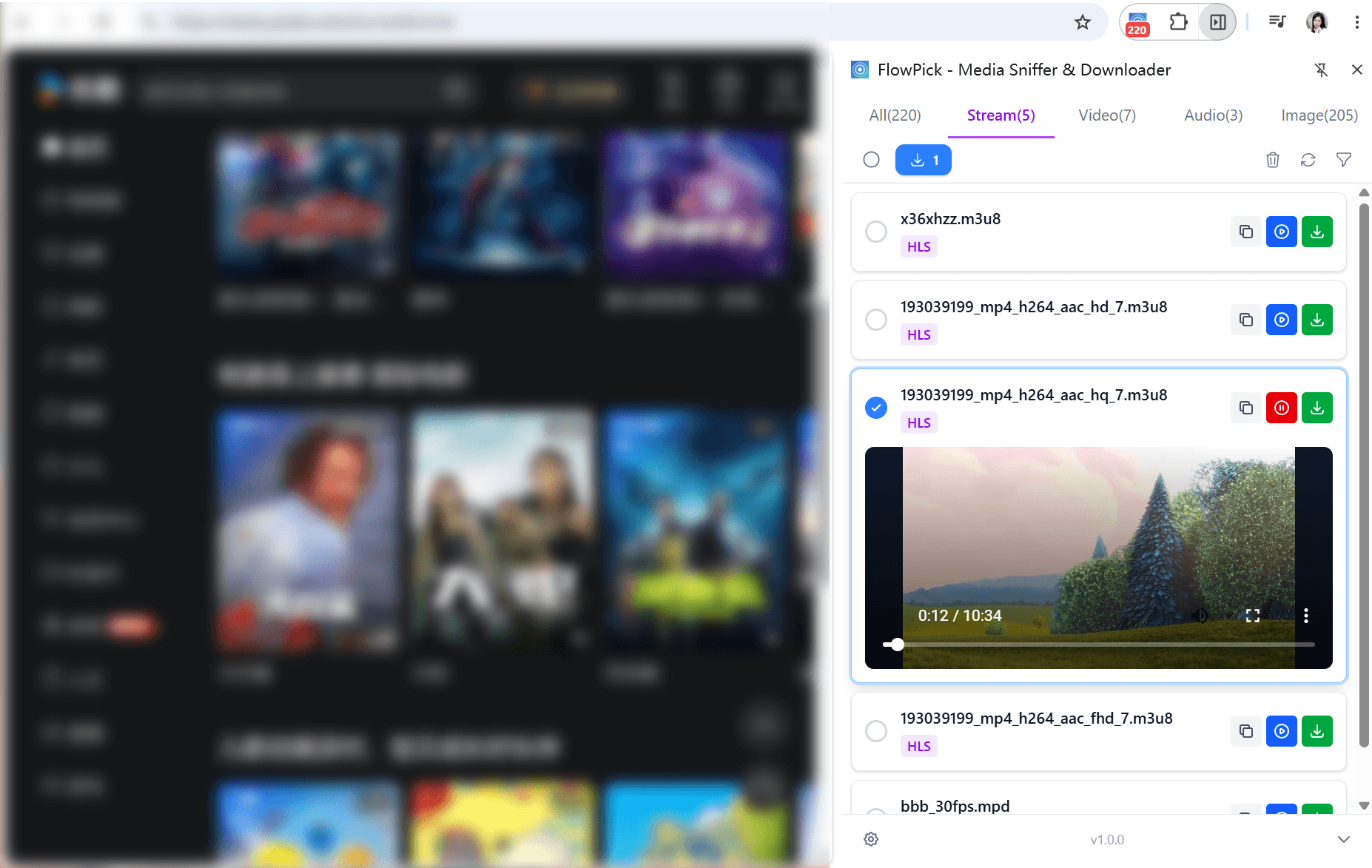
Master Playlist vs Media Playlist
HLS manifests are divided into two levels:
| Type | Content | Example |
|---|---|---|
| Master Playlist | Lists all available quality variants, each pointing to a Media Playlist | Index containing multiple streams at 360p, 720p, 1080p, etc. |
| Media Playlist | Lists specific TS fragment URL sequence | Contains addresses of hundreds of .ts files |
FlowPick auto-identifies Master Playlists, parses out all quality options for you to select. After selecting quality, downloads corresponding Media Playlist to get fragment list.
Master Playlist (index.m3u8)
    │
    ├── 360p  → 360p.m3u8  →  segment-001.ts, segment-002.ts, ...
    ├── 720p  → 720p.m3u8  →  segment-001.ts, segment-002.ts, ...
    └── 1080p → 1080p.m3u8 →  segment-001.ts, segment-002.ts, ...
Quality Selection
Quality options parsed from Master Playlist are sorted by bitrate from high to low:
| Quality | Typical Resolution | Typical Bitrate | Use Case |
|---|---|---|---|
| Original/Ultra HD | 1080p+ | 5-12 Mbps | Large screen viewing, best quality needed |
| HD | 720p | 1.5-3 Mbps | Laptop viewing |
| SD | 480p | 0.8-1.5 Mbps | Small screen devices |
| Smooth | 360p | 0.4-0.8 Mbps | Audio only, mobile networks |
Fragment Download & Merging
HLS videos consist of large numbers of TS fragments (typically 2-10 seconds each). FlowPick's processing flow:
- Parse Media Playlist to get all fragment URLs
- Multi-threaded concurrent download of fragments (concurrency adjustable in settings)
- After download completes, merge fragments into single file
- Remux supported tracks locally using the browser media pipeline.
Encrypted Streams (AES-128)
Some HLS streams use AES-128 encryption to protect content. FlowPick supports automatic decryption:
- Detects
#EXT-X-KEY:METHOD=AES-128,URI="..."tag - Auto-downloads decryption key
- Uses Web Crypto API to decrypt each fragment in browser
- Decrypted fragments merge normally, output unencrypted file
DASH (MPD) Streams
DASH (Dynamic Adaptive Streaming over HTTP) is an international standard streaming protocol established by MPEG, widely used by platforms like YouTube and Netflix.
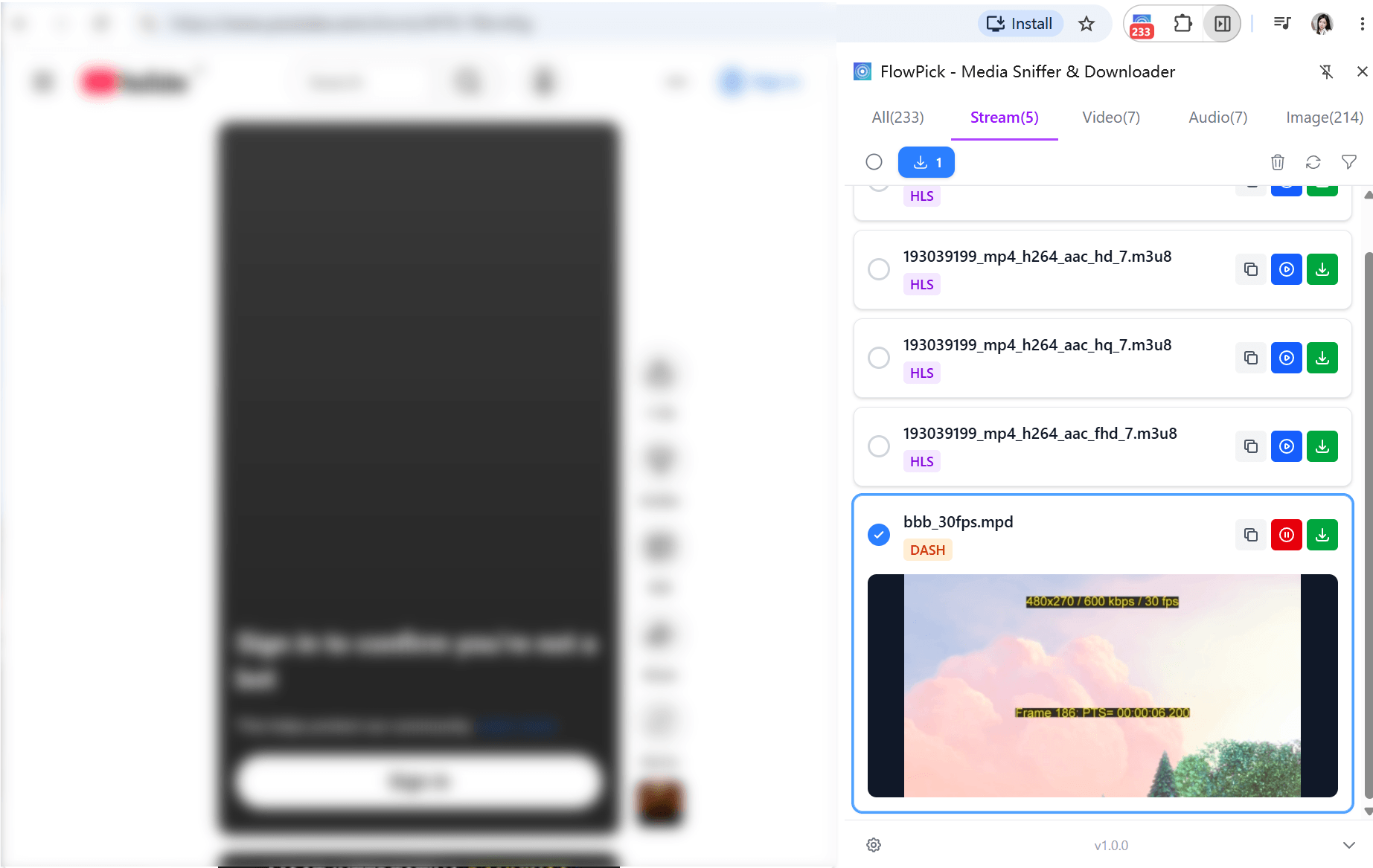
DASH Characteristics
Compared to HLS, DASH has these characteristics:
| Feature | HLS | DASH |
|---|---|---|
| Fragment Format | Usually TS | Usually FMP4 (segmented MP4) |
| Audio/Video | Usually combined together | Usually separated as independent tracks |
| Manifest Format | M3U8 (text) | MPD (XML) |
| Encryption | AES-128 | AES-128 or DRM |
| Codecs | H.264 dominant | H.264, H.265, VP9, AV1 |
Separate Audio/Video Processing
A key characteristic of DASH is that video and audio are usually separated into independent tracks. FlowPick's processing flow:
- Parse MPD manifest, identify video track and audio track
- Download video fragments and audio fragments separately
- Download initialization segments (init segment), containing codec configuration info
- Remux supported tracks locally using the browser media pipeline.
MPD Manifest
    │
    ├── AdaptationSet: Video (H.264, 1080p)
    │   ├── init segment (codec config)
    │   ├── segment-001.m4s
    │   ├── segment-002.m4s
    │   └── ...
    │
    └── AdaptationSet: Audio (AAC, 128kbps)
        ├── init segment (codec config)
        ├── segment-001.m4s
        ├── segment-002.m4s
        └── ...
                    ↓
            Browser track remuxing
                    ↓
              output.mp4
Encryption Support
Same as HLS, FlowPick supports AES-128 fragment-level encryption for DASH streams. DRM-protected streams (Widevine, PlayReady) cannot be handled.
Direct Video Files
For direct video files (MP4, WebM, MKV, etc.), detection and download process is simplest:
- Instant Detection: Video URL immediately detected when appears in network requests
- Direct Download: No fragment merging or format conversion needed, browser directly downloads original file
- Size Preview: If server returns
Content-Lengthheader, file size displayed
Direct video files typically appear in following scenarios:
- MP4 videos embedded directly in websites
- Short videos on social media
- Video assets on gallery websites
- Directly linked video files
Detection Differences: Extension vs Online Tool
| Capability | Browser Extension | Online Tool |
|---|---|---|
| Auto Detection | Auto-monitors all network requests | Requires manual paste of stream URL |
| CORS Restrictions | Supported page-context requests; source restrictions still apply | Subject to same-origin policy |
| Encrypted Streams | Supports AES-128 decryption | Supports AES-128 decryption |
| Detection Scope | All requests on current tab | Only user-provided URLs |
| Usage Barrier | Requires extension installation | No installation needed |
Troubleshooting
Video Not Detected
| Cause | Solution |
|---|---|
| Page loaded before extension installed | Refresh page and replay video |
| Video not started playing | Play video for 3-5 seconds, ensure manifest file loaded |
| Video uses dynamic loading | Drag progress bar to different positions to trigger more fragment requests |
| Website uses non-standard protocols | Check if HLS/DASH/direct video files supported |
| Other extension conflicts | Temporarily disable ad blockers or other network extensions and retry |
Encrypted Stream Download Failed
| Cause | Solution |
|---|---|
| DRM protection (Widevine etc.) | Not supported, FlowPick cannot decrypt DRM content |
| Key server requires authentication | Some paid content keys require Cookie/Token, ensure logged in |
| Key URL inaccessible | Check network connection, key server may be blocked by firewall |
Slow Download Speed
| Cause | Solution |
|---|---|
| Concurrent threads too low | Increase concurrent threads in settings (recommend 4-6) |
| CDN rate limiting | Some CDNs limit per-IP speed, cannot bypass |
| Insufficient network bandwidth | Select lower quality to reduce file size |
Merged Video Cannot Play
| Cause | Solution |
|---|---|
| Some fragments failed to download | Re-download, ensure all fragments complete |
| Output format incompatible | Try switching output format (MP4 ↔ TS) |
| Encryption key error | Refresh page to re-obtain key |
Related Documentation
- Usage Guide — Operation guide for video detection and download
- Audio Capture — Detection and download of audio files
- Image Download — Detection and batch download of image resources
- Format Conversion — Detailed technical explanation of TS/MP4 remuxing
- Download Engine Architecture — Fragment download, concurrency control, retry mechanism
- Online Tools — Feature comparison between extension and online tools
- Configuration Reference — Concurrent threads, output format and other settings
- Common Issues Troubleshooting — Diagnostic methods for download issues
- Known Limitations — DRM protection, Manifest V3 and other technical limitations
- Privacy & Security — Network monitoring and privacy protection notes
Configuration Reference
Complete configuration options for FlowPick, including download settings, filtering rules, save strategies, advanced parameters, and scenario-based configurations.
Audio Capture
Complete technical documentation for FlowPick audio detection and download, covering audio formats, podcast detection, metadata extraction, batch download, and troubleshooting.